Content manager
How to view, filter, and manage the content status of all your products and collections in one place.
What is Content Manager?
Content Manager gives you a complete overview of all your products and collections with their content status. You can see which items have been optimized, which still need descriptions, and take action directly from the table.
- See all products and collections in one place
- Filter by content status (all, empty, unoptimized)
- Generate, re-optimize, or publish content for any item
- Track your overall content optimization progress
How to use Content Manager
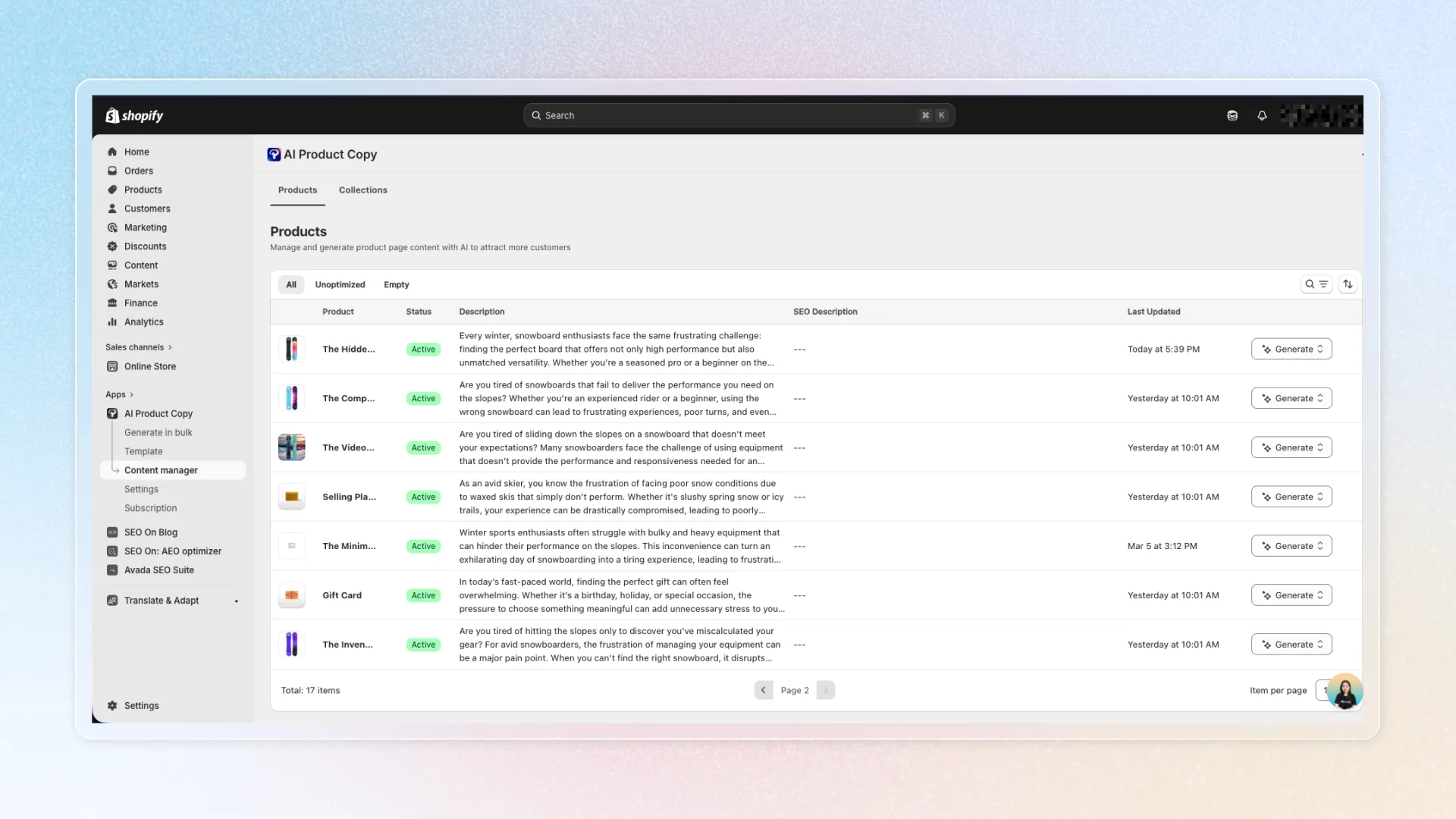
Browse products and collections
-
Go to Content Manager
-
Switch between Products and Collections tabs
-
Use filters to find specific items:
-
All Products: View your entire catalog
-
Empty: Products without descriptions
-
Unoptimized: Products with content not yet optimized by AI
-
-
Use the search bar to find items by name
Take action on individual items
Each product or collection in the table has an action dropdown with these options:
- Generate: Create new AI content for this item
- Generate again: Run AI again to improve existing content
- Publish: Push generated content to your Shopify store
- View on Shopify: Open the item directly in Shopify Admin
Tips
- Start by filtering "Empty" to identify products that need attention most
- After running bulk generation, use Content Manager to review and publish results
- Use "Generate again" when you've updated your templates or settings and want better results