Update Accessibility Statement
The accessibility statement is a public page on your store that communicates your commitment to accessibility and the current status of your compliance efforts. Keeping it up to date builds trust with visitors and demonstrates ongoing compliance.
How to Update
Step 1: Access Update Statement
Navigate to Accessibility Scanner in the app, then click the Update Statement button. This opens the statement editor.
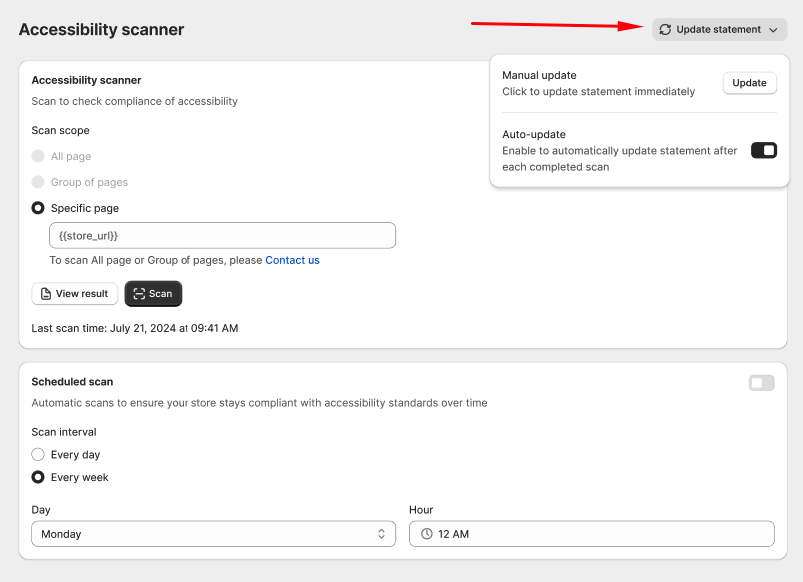
Step 2: Select issues and update method
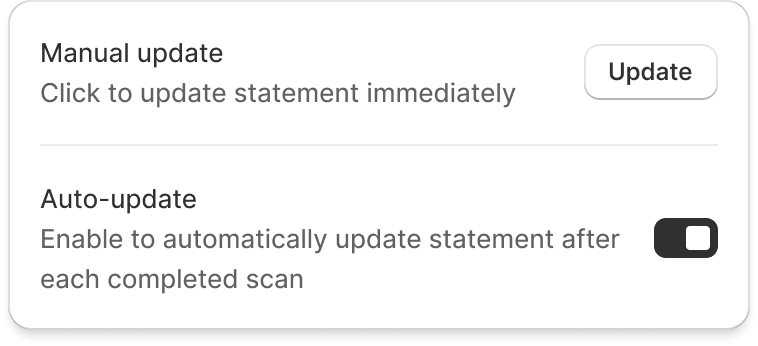
Choose how to update your statement:
| Method | Description |
|---|---|
| Manual update | Review each issue from your latest scan and manually mark its status (resolved, in progress, or known issue). |
| Auto-update | Automatically sync the statement with your latest scan results. Resolved issues are removed and new issues are added. |
Step 3: Review the statement
Preview your updated accessibility statement before publishing. Verify that:
- Resolved issues are correctly marked or removed.
- New issues are listed with appropriate status.
- The statement accurately reflects your current compliance state.
Click Save to publish the updated statement.
Best Practices
- Run scans regularly -- Scan your store at least weekly to catch new issues from content updates and theme changes.
- Update issue statuses promptly -- When you fix an issue, mark it as resolved in the scanner so the statement stays accurate.
- Maintain a current statement -- An outdated accessibility statement can undermine trust and may not satisfy regulatory requirements.
If you use Auto-update, the statement will automatically reflect your latest scan results each time you run a new scan. This is the recommended approach for most stores.