Settings
Settings covers notifications, per-platform events, order value, attribution, consent, and data retention. Each section saves through the save bar that appears at the top of the page once you change something — Save commits, Discard puts it back.
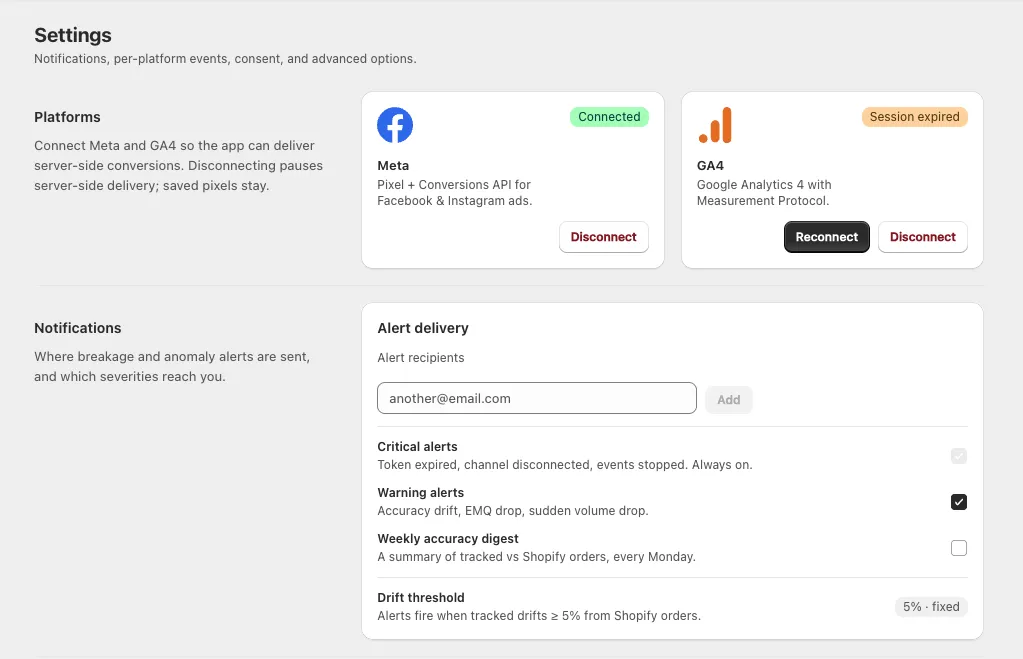
Platforms
Connect Meta and GA4 so the app can deliver server-side conversions. One card per platform, each with a status badge:
| Badge | What to do |
|---|---|
| Connected | Nothing — you're good |
| Session expired | Click Reconnect. Server-side delivery for that channel is stopped until you do |
| Not connected | Click Connect Facebook (Meta) or Connect Google (GA4) |
Disconnect logs the app out of that platform. It pauses server-side delivery, but your saved pixels stay exactly as they are — reconnecting resumes them.
Notifications
Where breakage and anomaly alerts are sent, and which severities reach you.
Alert recipients — add as many email addresses as you like: type one in and click Add. Remove one with the × on its tag. You can't remove the last remaining address.
| Setting | Notes |
|---|---|
| Critical alerts | Token expired, channel disconnected, events stopped. Always on — this one can't be turned off |
| Warning alerts | Accuracy drift — tracked Purchases running below your real Shopify orders |
| Drift threshold | Fixed at 5% — alerts fire when tracked drifts 5% or more from Shopify orders |
Tracking events
Choose which funnel events each platform fires, and whether they're sent from the browser, the server, or both. There's one card per platform, and each event is its own box with two checkboxes.
| Funnel event | Meta | GA4 |
|---|---|---|
| Page view | ✓ | — |
| View product | ✓ | ✓ |
| Add to cart | ✓ | ✓ |
| Begin checkout | ✓ | ✓ |
| Payment info | ✓ | ✓ |
| Purchase | ✓ | ✓ |
Meta supports all six events; GA4 supports five (it has no page-view equivalent in this app). The badge on each card tells you how many.
Purchase carries a Core badge. Its Browser checkbox is locked on, because Purchase is the event that feeds Reconciliation — the app won't let you turn off the thing it measures accuracy with. You can still choose whether Purchase is also sent from the server.
By default every event is on for both browser and server.
Why send from both? The browser hit gives you the best match and click attribution. The server hit survives ad-blockers and iOS restrictions. They share one event ID so the platform counts them once — see Deduplicated in Diagnostic.
Order value
How conversion value is calculated on Purchase events. Whatever you choose is applied identically on the browser and on the server, so deduplication never mismatches.
- Include shipping — add shipping to the conversion value sent to platforms
- Include tax — add tax to the conversion value
- Currency — Store currency or Presentment currency (what the shopper actually paid in)
Attribution
How conversions are credited to ad interactions. These windows apply when the app sends conversions; each platform still attributes with its own model afterwards.
| Setting | Options |
|---|---|
| Click-through window | 1 day · 7 days (recommended) · 28 days |
| View-through window | Off · 1 day (recommended) · 7 days |
Under the dropdowns the app spells out the result — for example "Current: 7-day click + 1-day view" — and reminds you that this drives the Reconciliation window. Widen the window and Reconciliation counts over a longer period.
There's also Engaged-view conversions (video) — "Count conversions within 1 day of a 10s+ video view." This one applies to Google Ads only, and Google Ads isn't a channel in the app yet, so it doesn't affect your Meta or GA4 tracking today.
Consent & privacy
Consent Mode v2 ships on with safe defaults. These controls are free and never locked behind a plan.
- Consent Mode enabled — gate firing on the shopper's consent state
- EU/EEA/UK deny-by-default — no events fire until a shopper grants consent in these regions
The default consent signals are listed as badges, all starting denied:
ad_storage · analytics_storage · ad_user_data · ad_personalization
Shoppers who decline consent aren't tracked. That's correct behaviour, and it's one of the ordinary reasons your tracked count sits below your real Shopify order count — see Reconciliation.
Data retention
Raw events (days) — how long raw event payloads are kept: 30, 60, or 90 days. Oldest retained shows the earliest date still covered.
Aggregates used for Reconciliation are retained regardless of this setting, so shortening retention doesn't erase your accuracy history.
Next steps
- Alerts — what the notification settings above feed
- Reconciliation — what the attribution window changes
- Connections — per-pixel settings live here, not in Settings