Plans & Pricing
Compare the five Avada Accessibility plans and see what each one includes.
Every plan comes with the full accessibility widget and the AI accessibility scan. Free, Starter, Growth and Scale differ mainly in monthly widget impressions and support level. Premium adds hands-on help from our team on top of everything in Scale.
Plans and Prices
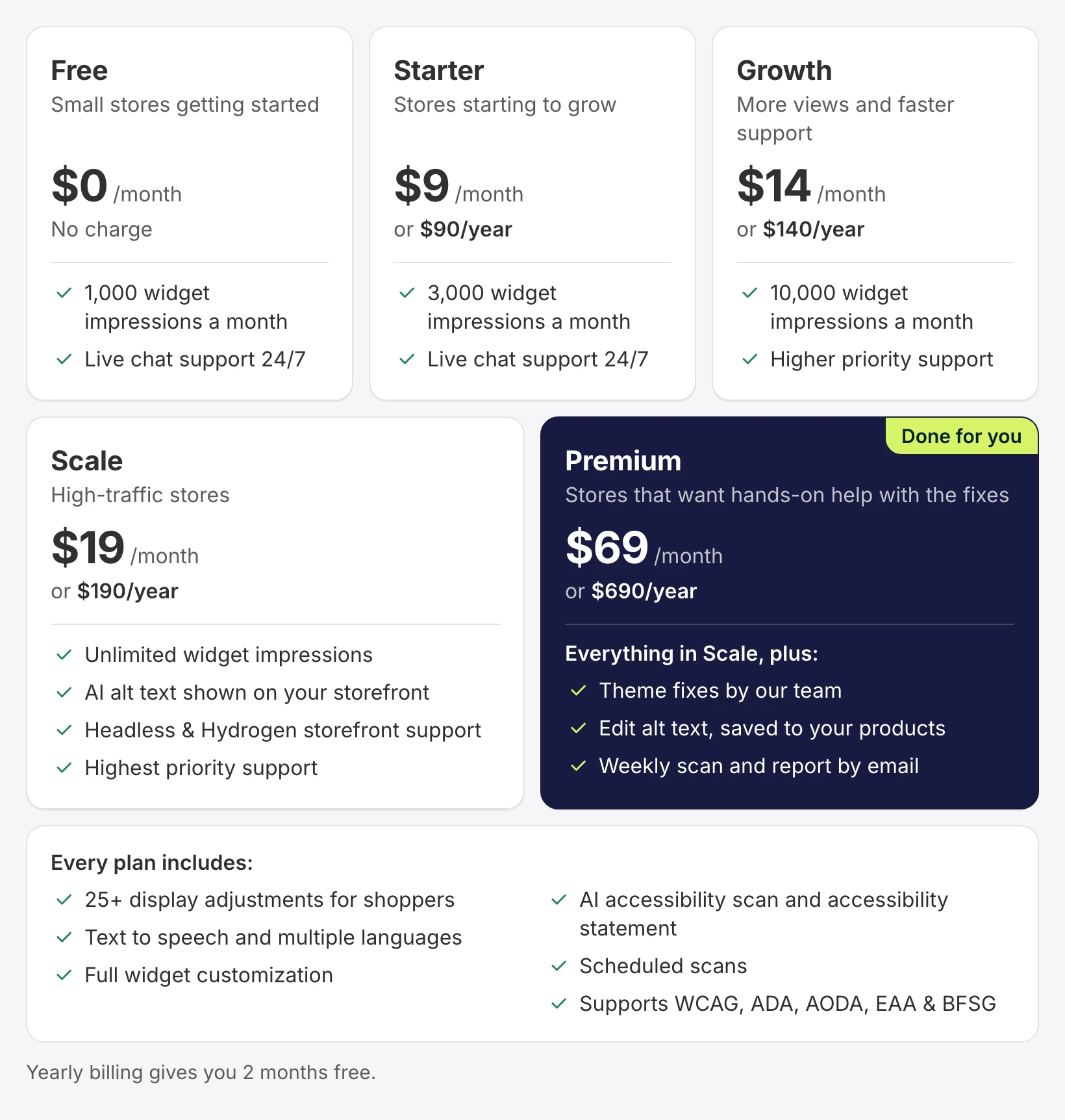
Text version: plans and prices
| Plan | Monthly | Yearly | Best for |
|---|---|---|---|
| Free | $0 | $0 | Small stores getting started |
| Starter | $9/month | $90/year | Stores starting to grow |
| Growth | $14/month | $140/year | More views and faster support |
| Scale | $19/month | $190/year | High-traffic stores |
| Premium | $69/month | $690/year | Stores that want hands-on help with the fixes |
Yearly billing saves about 17% compared with paying monthly on the same plan (2 months free).
Compare All Plans
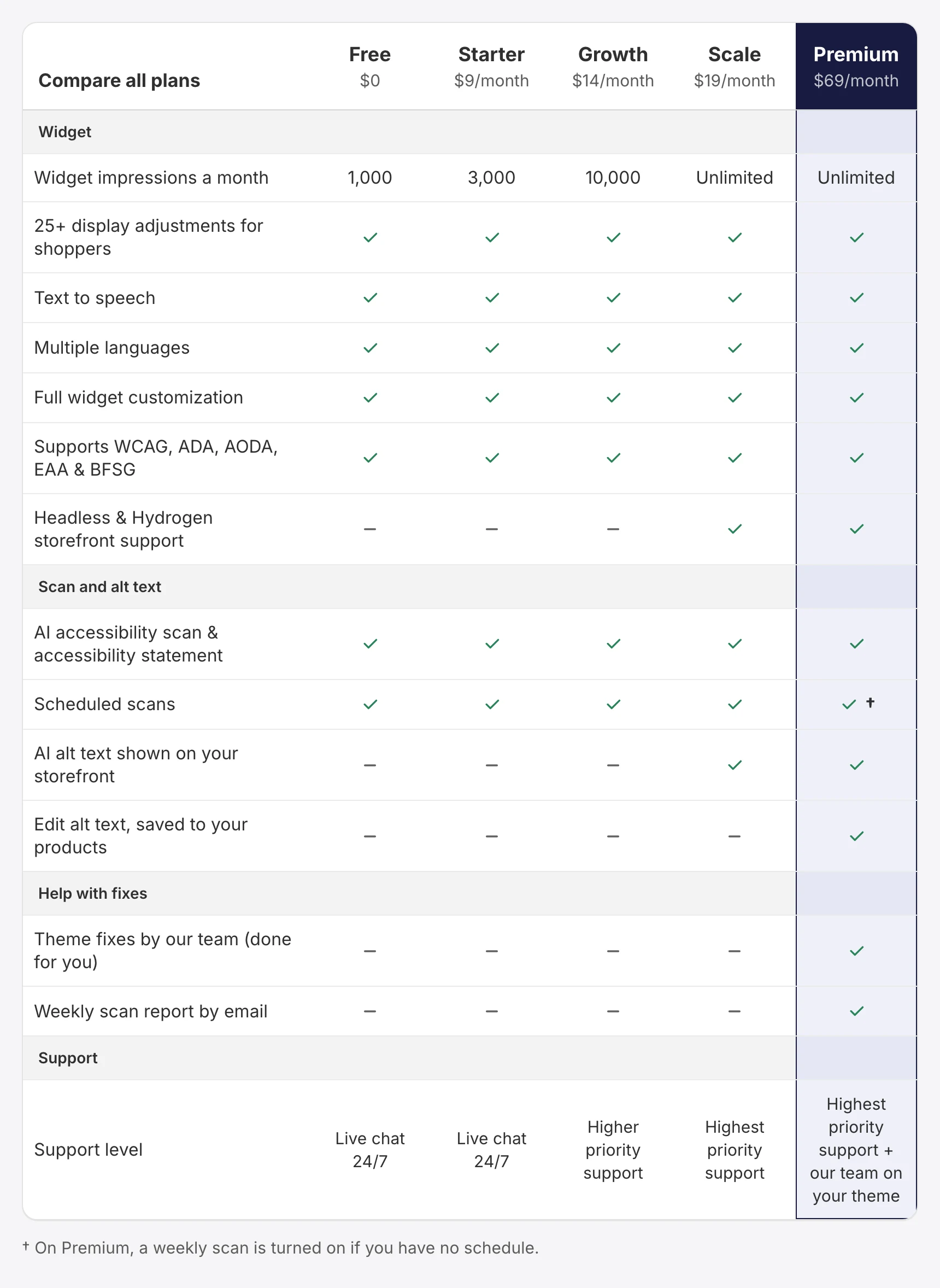
Text version: compare all plans
| Feature | Free | Starter | Growth | Scale | Premium |
|---|---|---|---|---|---|
| Widget | |||||
| Widget impressions a month | 1,000 | 3,000 | 10,000 | Unlimited | Unlimited |
| 25+ display adjustments for shoppers | Yes | Yes | Yes | Yes | Yes |
| Text to speech | Yes | Yes | Yes | Yes | Yes |
| Multiple languages | Yes | Yes | Yes | Yes | Yes |
| Full widget customization | Yes | Yes | Yes | Yes | Yes |
| Supports WCAG, ADA, AODA, EAA & BFSG | Yes | Yes | Yes | Yes | Yes |
| Headless & Hydrogen storefront support | No | No | No | Yes | Yes |
| Scan and alt text | |||||
| AI accessibility scan & accessibility statement | Yes | Yes | Yes | Yes | Yes |
| Scheduled scans | Yes | Yes | Yes | Yes | Yes, weekly scan turned on if you have no schedule |
| AI alt text shown on your storefront | No | No | No | Yes | Yes |
| Edit alt text, saved to your products | No | No | No | No | Yes |
| Help with fixes | |||||
| Theme fixes by our team (done for you) | No | No | No | No | Yes |
| Weekly scan report by email | No | No | No | No | Yes |
| Support | |||||
| Support level | Live chat 24/7 | Live chat 24/7 | Higher priority support | Highest priority support | Highest priority support + our team on your theme |
AI alt text on the storefront is available on Scale and Premium for stores that installed the app after June 17, 2025.
What Counts as an Impression
One impression is one load of the accessibility widget on your storefront by a visitor. The counter resets at the start of each 30-day billing cycle. The app shows a warning when you've used 80% of your monthly impressions.
When a store on a limited plan runs out of impressions, the widget stops showing on the storefront until the cycle resets or you upgrade. Your settings are kept, but your store is not covered while the widget is hidden.
What Premium Adds
Premium includes everything in Scale, plus three kinds of hands-on help.
| What you get | How it works |
|---|---|
| Theme fixes by our team | Our team works on what can be fixed in your theme, based on your scan results. No request needed. We tell you when a fix needs your input, for example a change to your design or content. |
| Edit alt text, saved to your products | The app adds alt text to product images that have none and saves it to your products. Alt text that is already there is not changed. You can edit any alt text on the Alt-text management page, and the app keeps your version. |
| Weekly scan and report by email | When you move to Premium, the app turns on a weekly scan if you don't have a schedule yet. After each weekly scan, you get a report by email. |
After upgrading, the only thing you need to do is give our team access to your theme once, so we can work on the fixes.
Premium helps reduce risk by fixing issues at the source. It does not replace legal advice.
How to Change Your Plan
Open the Plans page
In the Avada Accessibility app, click Plans in the left menu. The page shows every plan with its price, plus the Compare all plans table.
Choose monthly or yearly
Use the Monthly / Yearly toggle at the top before you pick a plan. Yearly is charged once for the whole year.
Choose a plan
Click Choose plan (or Upgrade) on the plan you want. If you have a discount code, apply it in the Plan details card on the same page first.
Approve the charge
Shopify opens its approval screen with the final price. Confirm the charge and you return to the app on your new plan, with the same widget settings.
You can also open Premium from See what's included in the app. That window shows the yearly price only. To pay monthly, open the Plans page and choose Premium there.
Frequently Asked Questions
Can I cancel at any time?
Yes. You can cancel your subscription at any time.
If I move from a paid plan to a lower plan, do I lose features?
You keep access to the app and its core features. What changes is your monthly impression limit, plus any features that are only on your old plan (see the table above). Once the lower limit is reached, the widget stops showing on your storefront, which may affect your store's accessibility compliance.
What happens if I leave Premium?
The alt text already on your products stays there, and your scan schedule stays as it is. You stop getting the weekly email report, the app stops adding alt text, you can no longer edit alt text in the app, and our team stops working on your theme.
Does Premium have a free trial?
No. Scanning your store and seeing what to fix are free on every plan, so you can check your results first and upgrade when you're ready.
Will Premium make my store ADA or EAA compliant?
It can help reduce risk: our team fixes theme issues by hand, and you can edit alt text and save it to your product images. No tool or service can promise full compliance or protection from lawsuits, so we recommend legal advice for your specific case.
Will you change my products or theme without asking?
We add alt text only to product images that have none. We never change alt text that's already there, and if you edit ours, we keep your version. For theme fixes, our team asks for access once, keeps a backup of your theme, and checks with you first if a fix changes your design.
How many theme fixes are included?
Our team works through the theme issues from your scans, so you don't need to send requests. If you spot something yourself, use Request a fix in the app and our team will take a look. Your weekly report shows what has been fixed and what is in progress.
Are the weekly email report and alt text editing on lower plans too?
The weekly email report and saving alt text to your products are part of Premium. Scheduled scans are available on every plan, and the results show in the app.
Will I be charged extra when I change plan?
No. Shopify handles the proration: upgrading to a more expensive plan prorates the charge within the same billing cycle, and downgrading generates a prorated app credit while keeping the same cycle.
Will I be charged after uninstalling the app?
Yes, for the period you already started. Shopify bills the full amount for the current subscription period, so uninstalling mid-cycle does not cancel that charge.
Will I be charged after switching from a paid plan to Free?
The current period is still billed in full. The app keeps working normally until the period ends.
Related Articles
If you have any questions about which plan fits your store, chat with us from the app. We're here to help!