How shipping label charges work
Understand exactly who charges you, where the money comes from, and why these charges don't appear on your Shopify invoice.
Introduction
When you buy a shipping label with Avada Shipping Labels, the cost of the label is not billed through your Shopify subscription. Instead, the charge is handled directly by EasyPost, our shipping carrier provider, using funds you top up into your own EasyPost wallet.
This page explains how that billing flow works, what Avada does (and does not) do with your money, and where to manage your shipping payments. Read it before you buy your first label so there are no surprises on your statements.
Understanding the billing flow
Two separate things are being paid for when you use Avada Shipping Labels, and each is handled by a different company:
- The Avada Shipping Labels app itself — billed through the Shopify Billing API on your regular Shopify invoice, according to the plan you chose (Free, Starter, Growth, or Pro).
- The shipping labels you buy — charged directly by EasyPost from the wallet inside your own EasyPost account.
Avada never sees your card, never holds your shipping funds, and never charges you for labels. We simply pass your label request to EasyPost on your behalf, using the API key you provide. EasyPost then deducts the label cost from your wallet and returns the printable label to the app.
In short:
Avada is the app. EasyPost is the shipping carrier and the payment processor for your labels. Two companies, two separate charges.
How to set up your EasyPost wallet
Sign up for EasyPost
Open a new browser tab and go to easypost.com. Click Sign up and create a free EasyPost account using your business email.
Open Account Settings → Billing
Once signed in to your EasyPost dashboard, expand Account Settings in the left sidebar and click Billing.
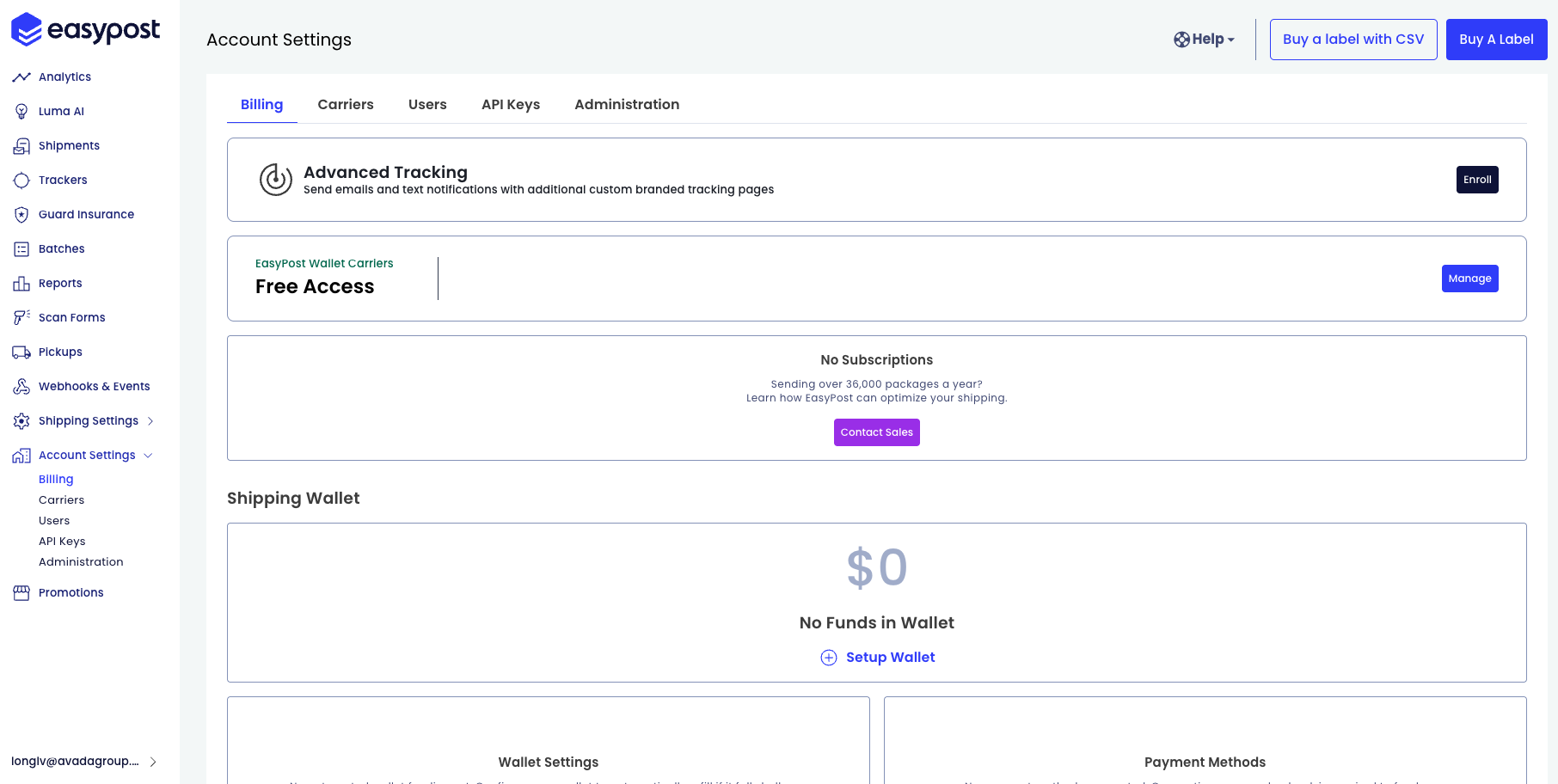
Set up the Shipping Wallet
Scroll to the Shipping Wallet section. If you see No Funds in Wallet, click + Setup Wallet to create it.
Connect a payment method
In the Payment Methods card, connect a credit card or bank account. This is the source EasyPost will use to refill your wallet.
Top up the wallet
Back in the Shipping Wallet card, add the amount you want to top up and confirm the charge. The balance becomes available in your wallet immediately.
Connect the API key to the app
In the sidebar, go to Account Settings → API Keys and copy your Production API key. Paste it into Avada Shipping Labels → Settings → API keys to connect your wallet to the app.
You are now ready to buy shipping labels. Every label purchased in the app will be paid from your EasyPost wallet.
How a label charge works
Click Buy label in the app
In Avada Shipping Labels, open an order and click Buy label after picking a carrier and service.
EasyPost charges your wallet
Avada sends your label request to EasyPost using your API key. EasyPost deducts the exact label cost from your wallet — no markups, no hidden fees added by Avada.
EasyPost returns the label
EasyPost returns the printable label and tracking number. The full transaction is recorded in your EasyPost dashboard → Account Settings → Billing, which is the source of truth for every shipping charge.
How to review and manage your charges
All shipping payments live in your own EasyPost account, not in Avada. From easypost.com → Account Settings → Billing you can:
- View your current Shipping Wallet balance
- See every transaction (label purchases, refunds, top-ups)
- Download monthly invoices for accounting
- Request refunds for unused or voided labels — refunds are credited back to your wallet directly by EasyPost
- Update your payment method or configure auto-recharge in Wallet Settings
Because the wallet belongs to you, you have full control. Avada cannot see your balance, move funds, or refund a label on your behalf.
Trying the app without paying for real labels
If you want to evaluate Avada Shipping Labels before opening an EasyPost account, you can use the Avada demo key that is pre-loaded in the app on first install.
The demo key runs in Test mode, which means:
- You can fetch real rates, generate sample labels, and explore every screen
- No money is charged — to you, to Avada, or to EasyPost
- Sample labels are marked TEST and cannot be scanned at a post office
When you are ready to ship real orders, sign up for EasyPost, top up your wallet, and replace the demo key with your own Production key. The switch takes under a minute and your test data is preserved.
For full details on EasyPost pricing, refunds, and billing rules, see the EasyPost billing documentation (opens in a new tab).