Redesign Widget Settings Layout
Applies to: All plans
The widget editor's settings panel has a new layout. Sections are now organized into a left-hand navigation instead of a horizontal tab bar. You can jump straight to any setting with the new search box.
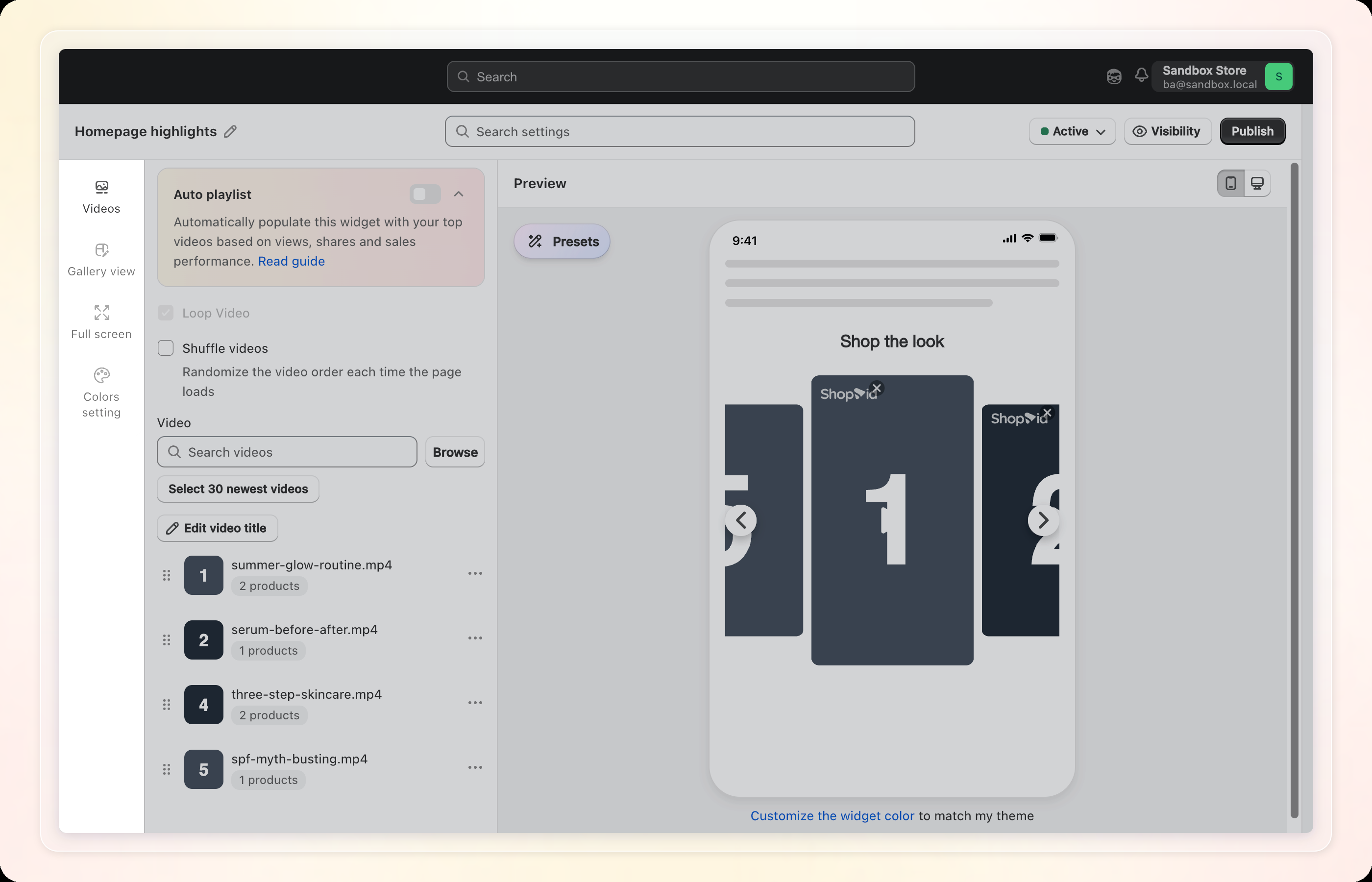
What's New
| Before | Now |
|---|---|
| Settings shown in a horizontal tab bar across the top | Settings grouped into a left-hand navigation |
| Float widgets had page targeting mixed into another tab | Float widgets get their own Placement tab; their old "Gallery view" tab is renamed Preview |
| First tab always labeled "Videos" | Product page widgets show Products instead |
| No way to search settings | Search settings box at the top finds any setting by name |
| Display, Product card, Video title, and Video player had one shared set of options | Separate Mobile / Desktop sub-tabs for each |
| Widget name was a field inside the settings | Click the pencil icon next to the widget name, in the header, to rename it inline |
| Status was a field inside the settings | Active/Inactive dropdown in the header |
| Widget ID / Widget snippet appeared after clicking Save | Click Publish in the header to open a Publish widget modal with both |
| No region-based visibility control | Visibility button in the header opens Visibility by region — All visitors, Selected countries, or Shopify market (Pro) |
| Font, Block title, Title size lived under General | Moved to the Gallery view tab |
| Auto match theme, Title color lived under General | Moved to the Colors setting tab |
How to use: Open Manage widget → select a widget to edit it → use the tabs on the left (Videos/Products, Gallery view/Preview, Placement for Float widgets, Full screen, Colors setting) to find a section, or type into Search settings at the top to jump straight to it.
Note: Search settings is still being updated, so a few settings may not appear in the results yet.
Note: Widgets created before this update keep Mobile/Desktop options on every section (not just Display, Product card, Video title, and Video player). If you'd like the newer, consolidated layout, contact support to migrate your widget.
See Setting up widgets for the full settings reference.