Performance
Instead of trusting the ad platform's own count, see what you spent on ChatGPT ads next to the Shopify orders those ads really brought in.
Open it from Performance in the app menu.
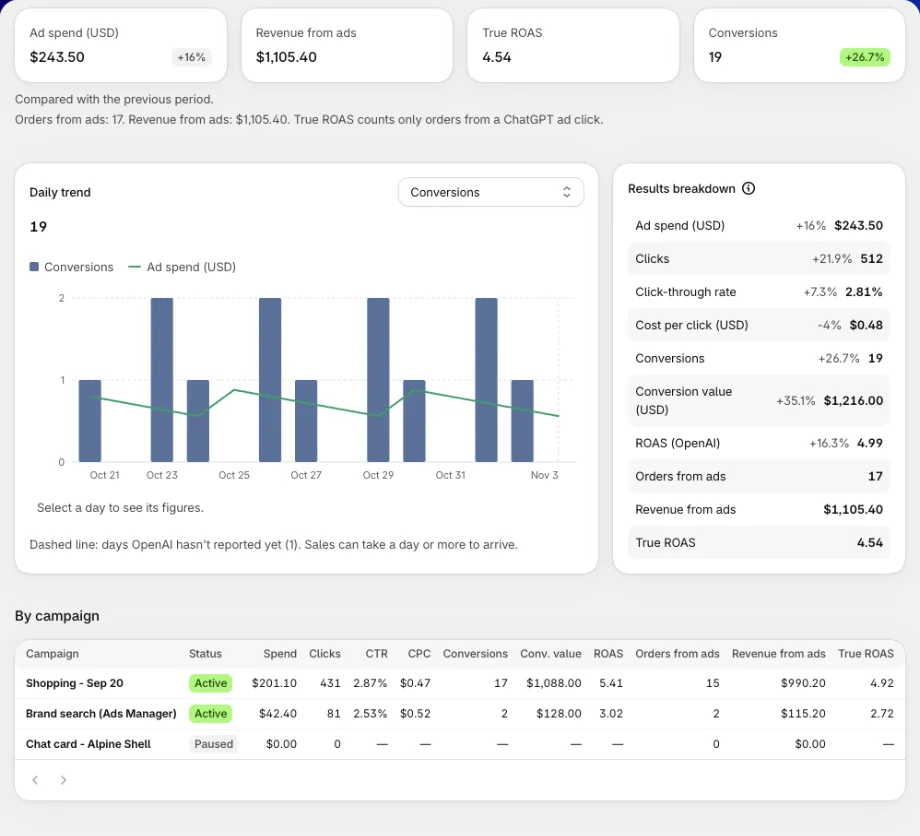
Two sets of numbers, side by side
The report shows two views of the same ads. They won't match, and that's useful: the gap shows how much of OpenAI's count turned into real sales in your store.
| OpenAI's figures | Your store's figures | |
|---|---|---|
| Comes from | ChatGPT Ads reporting | Your Shopify orders from a ChatGPT ad click |
| Figures | Ad spend, Clicks, Click-through rate, Cost per click, Conversions, Conversion value, ROAS (OpenAI) | Orders from ads, Revenue from ads, True ROAS |
| Currency | Your ad account's currency | Your store's currency |
| Arrives | A day or more later for purchases | As orders come in |
| Changes with Attribution | ✅ | — |
True ROAS is your revenue from ChatGPT ads divided by what OpenAI says you spent. It counts only orders from a ChatGPT ad click.
Revenue from ads is what customers paid, minus refunds. Cancelled orders count as 0.
Pick the dates and attribution
The toolbar at the top sets what the whole report covers.
| Control | What it does |
|---|---|
| Date range | Today, Yesterday, Last 7 days, Last 14 days, Last 30 days (the default), Last 90 days, or Custom range. Dates follow your ad account's time zone. |
| Attribution | How OpenAI credits a purchase to an ad: a 30, 14 or 7-day click window, with or without a 1-day view window. Count sales on dates a sale by the Ad click or view or by the Purchase. The default, 30-day click and 1-day view, matches Ads Manager. |
| Export | Export CSV downloads the campaign table. Export orders downloads your orders from ChatGPT ads. |
| Refresh | Reads the report again. |
OpenAI keeps 365 days of reporting, so a custom range must start within the last 365 days and end today or earlier.
Attribution changes only OpenAI's conversion figures. Your own orders don't move. How far back the app links an order to a ChatGPT ad click follows the Purchase check window in Settings.
Overview tab
Headline tiles
Four tiles: Ad spend, Revenue from ads, True ROAS and Conversions. Each shows its change against the previous period of the same length. The line under the tiles says how many Orders from ads made up the revenue.
Daily trend
Bars show Clicks or Conversions, picked in Metric. The line shows Ad spend. A dashed line marks days OpenAI hasn't reported yet, because sales can take a day or more to arrive. Those days are left open, not drawn as zero.
Results breakdown
Every figure of the range, one per row: OpenAI's first, then yours.
By campaign
One row per campaign, with OpenAI's columns (Spend, Clicks, CTR, CPC, Conversions, Conv. value, ROAS) beside yours (Orders from ads, Revenue from ads, True ROAS).
By product
The products OpenAI reported for the range, with Impressions, Clicks and Spend. OpenAI keeps product figures for about 30 days. For an older range, the table shows Last 30 days only.
Order report
At the bottom, the Order report lists your most recent orders in the attribution window, how the app got each one, and whether it was sent to ChatGPT Ads. Click View all to filter them by Sent, Not sent or Found later only. It works the same as on Home.
Products tab
See which products ChatGPT ads actually sell. Each row puts your Shopify orders for a product beside what OpenAI reported for it.
| Column | What it shows |
|---|---|
| Product | The product, from your store. |
| Orders | Orders from ChatGPT ads that include it. |
| Units | Units sold in those orders. |
| Revenue | The product's line total, in your store's currency. |
| Clicks | Clicks OpenAI reported for it. |
| ROAS | Revenue divided by OpenAI's spend on that product. |
Revenue here is each product's line total, so the rows don't add up to order totals. Only the top 200 products are listed.
ROAS is shown only where OpenAI stated the product's spend. Otherwise the cell shows — with the reason, like No ad spend, OpenAI didn't report its spend or Different currencies.
Breakdown tab
Delivery by segment splits spend, impressions and clicks by Country, Device or Platform, picked in Split by. OpenAI doesn't report conversions by segment, so ROAS isn't shown here.
Why a figure shows —
A dash means the app couldn't get a real number. The app never shows a guess or a zero instead. The line under the tiles, or the cell itself, says why.
| What you see | Why | What to do |
|---|---|---|
| Not shown: your store sells in ... and the ad account pays in ... | The two currencies differ. The app doesn't convert currencies, so true ROAS is withheld. | Nothing to fix. Compare OpenAI's figures and your own revenue on their own. |
| Not shown: your orders were paid in more than one currency. | Revenue in several currencies can't be added up. | Nothing to fix. |
| Not shown: the app only counts orders from ... | The range starts before the app began measuring. | Pick a range that starts on or after that date. |
| Not reported before ... under Conversion value and ROAS (OpenAI) | OpenAI reports purchase value only from that date. | Pick a range that starts on or after it. |
| Not every order in this range could be read, so your own figures may be low. | The range holds more orders than one read covers. | Pick a shorter range. |
| We couldn't read your orders for this range. | The order read failed. | Click Refresh. |
| A dashed line in Daily trend | OpenAI hasn't reported those days yet. | Check again tomorrow. |
Purchases reach OpenAI's figures with a delay of a day or more. Don't judge a campaign on today's Conversions alone.
FAQs
Why don't OpenAI's conversions match my orders from ads?
They're counted differently. OpenAI credits purchases inside its own attribution window, including views if you choose. Your orders from ads count only Shopify orders from a ChatGPT ad click. The gap between them is what the report is for.
Why is True ROAS a dash?
Most often your store and your ad account use different currencies. The app never converts currencies, so it withholds true ROAS and says why under the tiles.
Do refunds and cancellations count?
Yes. Revenue from ads is what customers paid minus refunds, and a cancelled order counts as 0.
How far back can I see results?
OpenAI keeps 365 days of reporting, and about 30 days of figures per product.
Does changing Attribution change my true ROAS?
No. Attribution changes only OpenAI's conversion figures. Your orders from ads stay the same.
Still have questions?
Chat with us from the app, any time.