Integrate with Microsoft Consent Mode (UET)
Microsoft Consent Mode allows your Microsoft UET (Universal Event Tracking) tags to respect visitor consent choices. This integration works alongside your existing UET setup.
Prerequisite: You must have a Microsoft UET Tag already set up on your store before enabling this integration.
Upload the Integration Script
First, download the integration file, then upload it to your Shopify theme:
Download the integration file here: avada-cookiebar-mcm-integration-v1.js (right-click the link and choose Save link as to save it to your computer).
- Go to Shopify Admin > Online Store > Themes > Actions > Edit Code.
- In the Assets folder, click Add a new asset.
- Upload the file you downloaded,
avada-cookiebar-mcm-integration-v1.js.
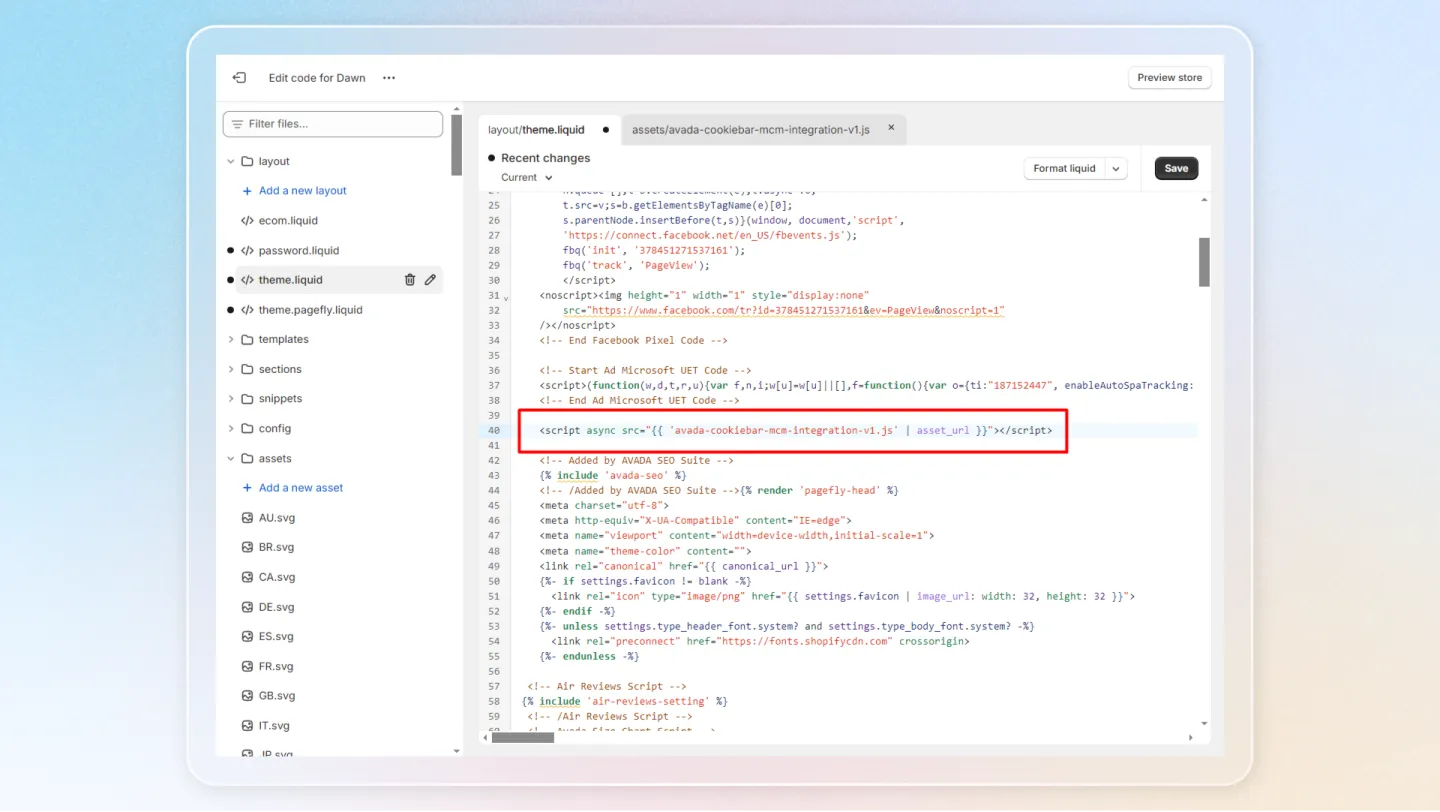
Add the Script to Theme.liquid
- Open your
theme.liquidfile. - Add the following script tag after your UET Tag script:
<script src="{{ 'avada-cookiebar-mcm-integration-v1.js' | asset_url }}" defer></script>Uploading the file alone does not activate the integration. You must also add this script tag to theme.liquid.
Turn On Microsoft Consent Mode
In the Avada Cookie Consent app, navigate to Integrations > Microsoft Consent Mode and click Turn on to enable the integration.
Once enabled, Microsoft Consent Mode will adjust UET tag behavior based on the visitor's consent status, ensuring compliance while still collecting aggregated data where permitted.