What is Auto-block cookies?
Auto-block lets Cookie Bar hold tracking scripts, iframes and pixels while a visitor's consent is denied. Where consent is granted by default, trackers run as normal until the visitor declines.
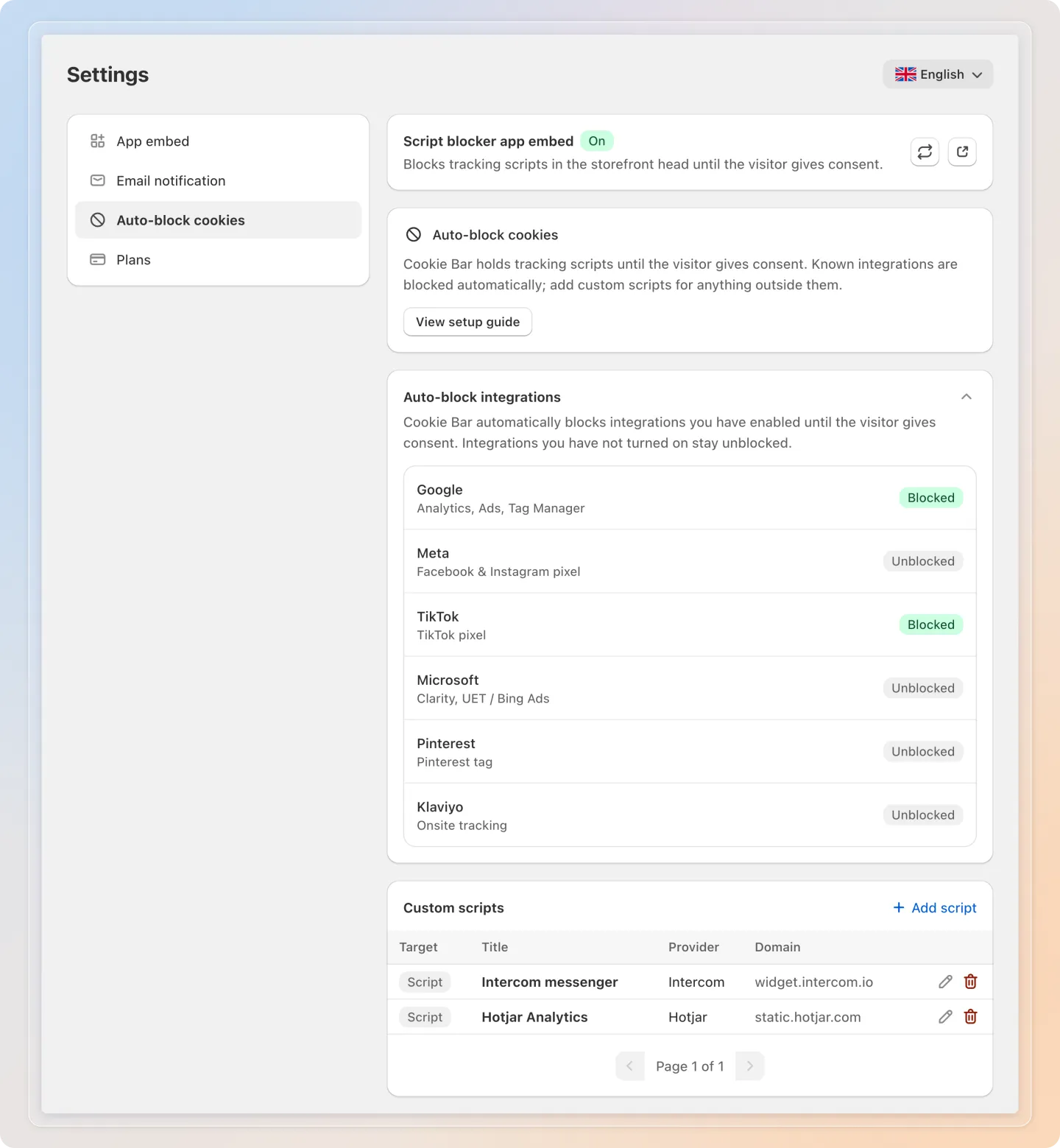
Turn on a known integration and Cookie Bar holds it automatically. For any tracker outside that list, add a custom rule. For a tag pasted straight into your theme, replace it with the blocked markup.
Plan: Auto-block itself is available on every plan. Blocking a known integration needs Pro or higher, and custom script rules need Advanced or higher.
You will find it in Cookie Bar → Settings → Auto-block cookies.
Why it matters
Regulations such as the GDPR require prior consent before non-essential tracking runs on your storefront. Auto-block keeps marketing and analytics scripts paused whenever a visitor's consent is denied, so trackers only run when your store is allowed to run them.
When Auto-block blocks, and when it does not
Auto-block does not block every visitor until they click Accept. It follows the visitor's consent state:
| Visitor's consent | What Auto-block does |
|---|---|
| Denied by default - the visitor is in a region where your banner asks for opt-in, or Shopify considers them subject to a privacy regulation | Holds trackers until the visitor accepts |
| Granted by default - for example, a visitor outside your banner's regions | Does not block. Trackers load normally |
| Declined - the visitor rejected tracking on the banner | Holds trackers, whatever the default was |
| Accepted | Releases trackers and they load normally |
So if your trackers still load for a visitor who has not answered the banner yet, check whether that visitor's consent is granted by default before treating it as a bug.
Two mechanisms, not one
Cookie Bar holds trackers back in two separate ways, and knowing which one handles your tracker is the whole setup.
| What it covers | Setup | |
|---|---|---|
| Consent signal | Passes the visitor's answer to Shopify's Customer Privacy API, which applies it inside its own Web Pixel sandbox: the Google & YouTube, Facebook & Instagram and TikTok channels, custom pixels under Customer events, and other apps' pixels | Always on, nothing to configure |
| Auto-block cookies | Neutralises tracker tags placed in your theme before the browser can run them, then puts them back as soon as consent is granted | Configured by you |
The rule that matters: a tracker installed through a Shopify sales channel or a custom pixel is handled by the consent signal, and Cookie Bar deliberately does not touch it. A tracker pasted into your theme is handled by Auto-block.
What Auto-block holds
| Source | What gets held |
|---|---|
| Auto-block integrations | The script domains of every integration you turned on and gave an ID to - Google, Meta, TikTok |
| Custom scripts | Any script, iframe or pixel from a domain you add yourself, for example Hotjar |
| Theme scripts | Scripts hardcoded in theme.liquid, once you replace their src with the blocked markup |
| Tags that run very early | Anything caught by the optional early blocker snippet at the top of <head> |
Once consent is granted, Cookie Bar releases them and they load normally.
Note: Auto-block needs two pieces working together. Your cookie banner collects the consent, and the Avada - Script Blocker app embed enforces it on the storefront.
What Cookie Bar cannot block
Auto-block recognises a tracker by the domain its script, iframe or pixel loads from. Anything a domain cannot identify, and anything outside your online store pages, is out of reach.
| Not blocked | Why, and what to do instead |
|---|---|
| Anything in Shopify's Web Pixel sandbox - sales channel pixels, custom pixels, other apps' pixels | An isolated frame Cookie Bar cannot reach. Turn on the Shopify Customer Privacy integration, then set each pixel's required consent in Settings → Customer events |
| Cookies that already exist | Cookie Bar stops the script that would set a cookie. It does not delete cookies already on the device |
| Requests that are not tags | Trackers reporting through fetch, XMLHttpRequest or navigator.sendBeacon. There is no tag to hold |
Inline scripts, code written into the page with no src | No domain to match, no URL to reload. Move the code into its own .js file, load it with src, then apply the blocked markup |
| Another app's app embed | Embeds start from inline code, so the embed itself cannot be held. A custom rule does stop any file it then loads from its own domain |
| Embedded video | Add an Iframe custom rule. For YouTube, switching the embed to youtube-nocookie.com is usually simpler |
| Checkout and thank-you pages | Shopify loads theme app embeds on your online store pages only |
| Server-side tracking, such as a Conversions API | Nothing runs in the visitor's browser, so there is nothing to hold |
| Domains your store needs | Shopify, jQuery, jsDelivr, Cloudflare and Google's static and API hosts are protected - blocking them would break your storefront |
Cookie Bar also leaves these alone by design: regular page links, images and your theme's own scripts; any integration you turned off; any integration you turned on but left the ID empty for, because that means Shopify's channel app owns the tag; and cookies you describe in Cookies management, which does not add them to the block list.
Blocking follows your banner's regions
Blocking follows the banner. A visitor outside your selected countries is never asked for consent, so their trackers are not held back. Set the banner to show in all countries if you want blocking everywhere.
One exception works the other way: a visitor Shopify considers subject to a privacy regulation is held back even outside your banner's countries. Those visitors then get no tracking at all until you widen the regions so they can consent.
On the first page view of a visit Cookie Bar does not yet know which side of that line a visitor falls on, so tags are held for a moment and then released. This is normal.
Tips
- Turn on Auto-block before you launch a marketing campaign, so trackers never fire for a visitor whose consent is denied.
- If a tracker is not a known integration, add it as a custom rule instead of leaving it unblocked.
Related articles
- How to turn on Auto-block cookies
- How to block each kind of tracker
- How to add the early blocker snippet
- Auto-block cookies FAQ
And there you have it! You now know what Auto-block does and how it keeps tracking paused while a visitor's consent is denied. If you have any questions or run into any issues, don't hesitate to reach out. We're here to help!