Conversion Lifecycle
A conversion is a referral order — a customer bought something because of an affiliate. Every conversion has a status that tells you where it is in the approval and payout flow.
The five statuses
| Status | Meaning | Tone |
|---|---|---|
| Pending | The order is in — waiting for you to approve. | Caution (yellow) |
| Approved | You approved it. Commission is locked in; waiting to be paid out. | Success (green) |
| Paid | You have paid this commission to the affiliate. | Info (blue) |
| Denied | You rejected it. Commission = $0. | Critical (red) |
| Refund adjustment | The order was refunded after the commission was paid. The amount appears as a negative offset that gets deducted from the affiliate's next payout. | Critical (red) |
The app does not use separate "Cancelled" or "Refunded" statuses. Refunds before payout silently reduce the commission on the existing row; refunds after payout create a separate Refund adjustment row.
The typical flow
Customer clicks ref link or uses coupon
   ↓
Customer completes order
   ↓
Web Pixel / Coupon matcher creates conversion
   ↓
[Pending]
   ↓
You review
   ├─ Approve → [Approved]
   │     ↓
   │  You mark the affiliate's payout as paid → [Paid]
   │
   └─ Deny → [Denied]
When a refund happens after the commission is Paid:
Order refunded in Shopify
   ↓
App receives refunds/create webhook
   ↓
Creates a separate row with status [Refund adjustment]
   ↓
Negative amount auto-deducts from the affiliate's next payout
Status transitions
| From → To | Allowed? | Notes |
|---|---|---|
| Pending → Approved | Yes | Click ✓ in the Actions column or use bulk Approve selected |
| Pending → Denied | Yes | Click ✕ in the Actions column or use bulk Deny selected |
| Approved → Pending | Yes | Use the Undo action on an approved row |
| Denied → Pending | Yes | Use the Undo action |
| Approved → Paid | Automatic | Triggered when you mark a payout as paid |
| Paid → anything | No | Once paid, the row is locked. Refund handling uses a separate Refund adjustment row. |
When a conversion is created
The app creates a Pending conversion in two cases:
- Referral-link orders — Web Pixel saw the
affily_refcookie and matches it to the checkout. The Tracking column shows aLinkbadge. - Coupon-code orders — the order's
discount_codes[]contains a code linked to an affiliate. The Tracking column shows aCouponbadge.
If both apply (visitor clicked a link AND used a coupon), coupon wins — see How tracking works.
Summary cards at the top
The Conversions page shows four summary cards above the table:
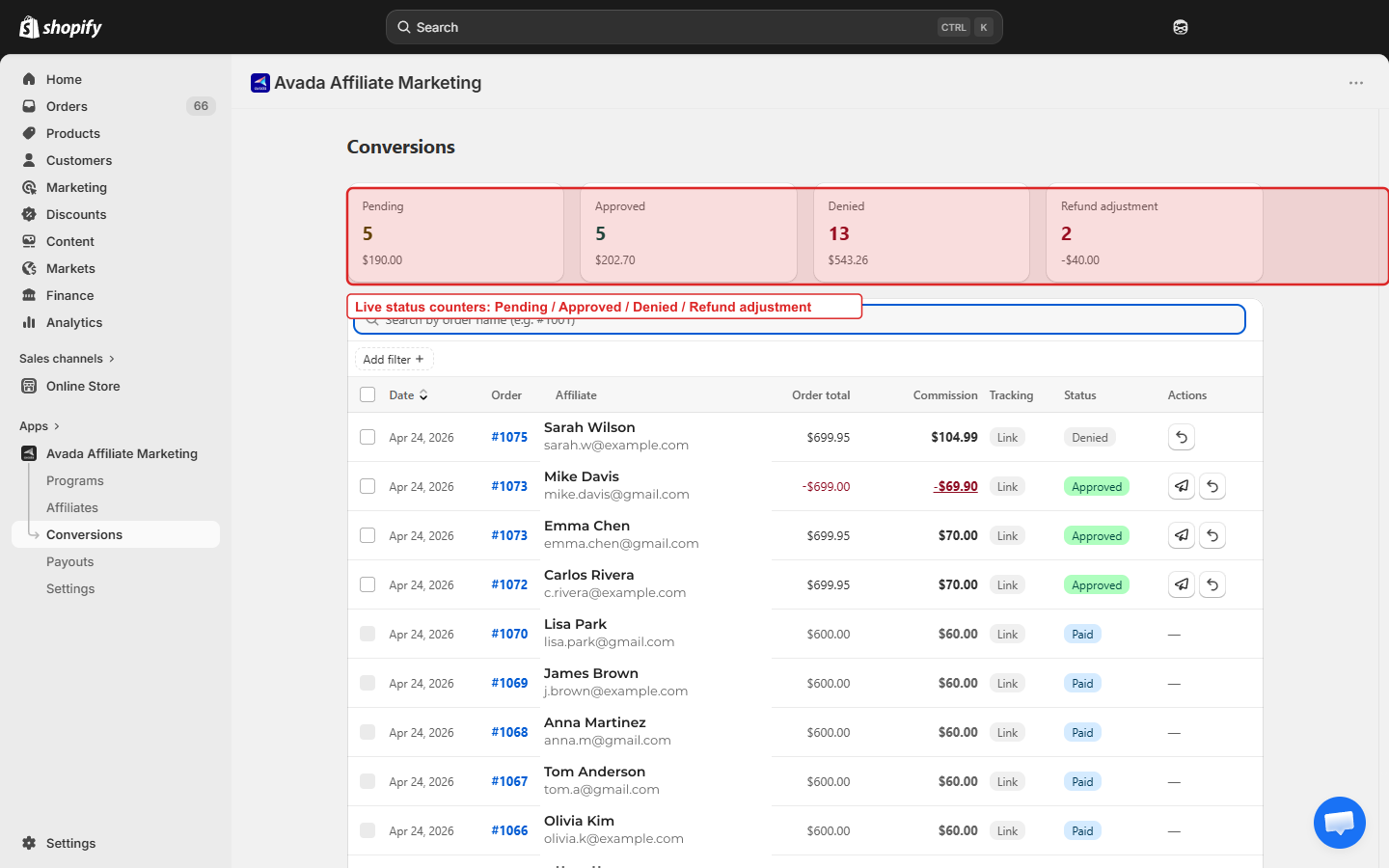
| Card | What it counts |
|---|---|
| Pending | Awaiting your review |
| Approved | Confirmed, awaiting payout |
| Denied | Rejected commissions |
| Refund adjustment | Negative offsets from post-payout refunds |
The total dollar amount of each status appears under its count. The numbers update in real time as you approve/deny rows.
Filtering the table
Filters available above the table:
- Status — Pending, Approved, Paid, Denied, Refund adjustment.
- Tracking type — All, Link, Coupon.
- Date range — Today, Last 7 days, Last 30 days, Custom.
There is also a search box that takes an order name like #1001.