Commission Types
Avada Affiliate Marketing has two commission rules. You pick one rule per program — and run several programs in parallel if you need different structures for different groups.
The two commission rules
The Commission rule dropdown on the program form has two options:
| Rule | How it works | Best for |
|---|---|---|
| Fixed commission | A single rate applied to every order. The rate can be a Percentage of the order subtotal or a Flat amount per order. | Most stores. Simple to explain. |
| Tiered by order value | Different rates for different order totals (e.g. 5% up to $100, 10% from $100, 15% from $500). Higher orders = higher rate. | High-AOV stores, rewarding big-basket referrals. |
These two are the only commission rules. There is no "Product-specific" rule and no per-product override — the program rate applies to the whole order, so every product in a referral order earns at the same rate.
Fixed – Percentage
Pick Fixed commission as the rule. Then set:
- Value type =
Percentage. - Commission amount = e.g.
10(means 10%).
Commission = order subtotal × rate / 100. The subtotal means line item totals before tax and shipping (and after any discounts applied to the order).
Example: A referral order has a subtotal of $120, $12 shipping, $10 tax. Commission at 10% = $12 (10% of $120, not $142).
Fixed – Flat amount
Pick Fixed commission as the rule. Then set:
- Value type =
Flat amount. - Commission amount = e.g.
5(means $5 per order).
Commission = $5 per order, regardless of subtotal.
Example: Orders of $30, $300, and $3,000 all pay the affiliate $5. Easy to budget but less motivating for the affiliate on big orders.
Tiered by order value
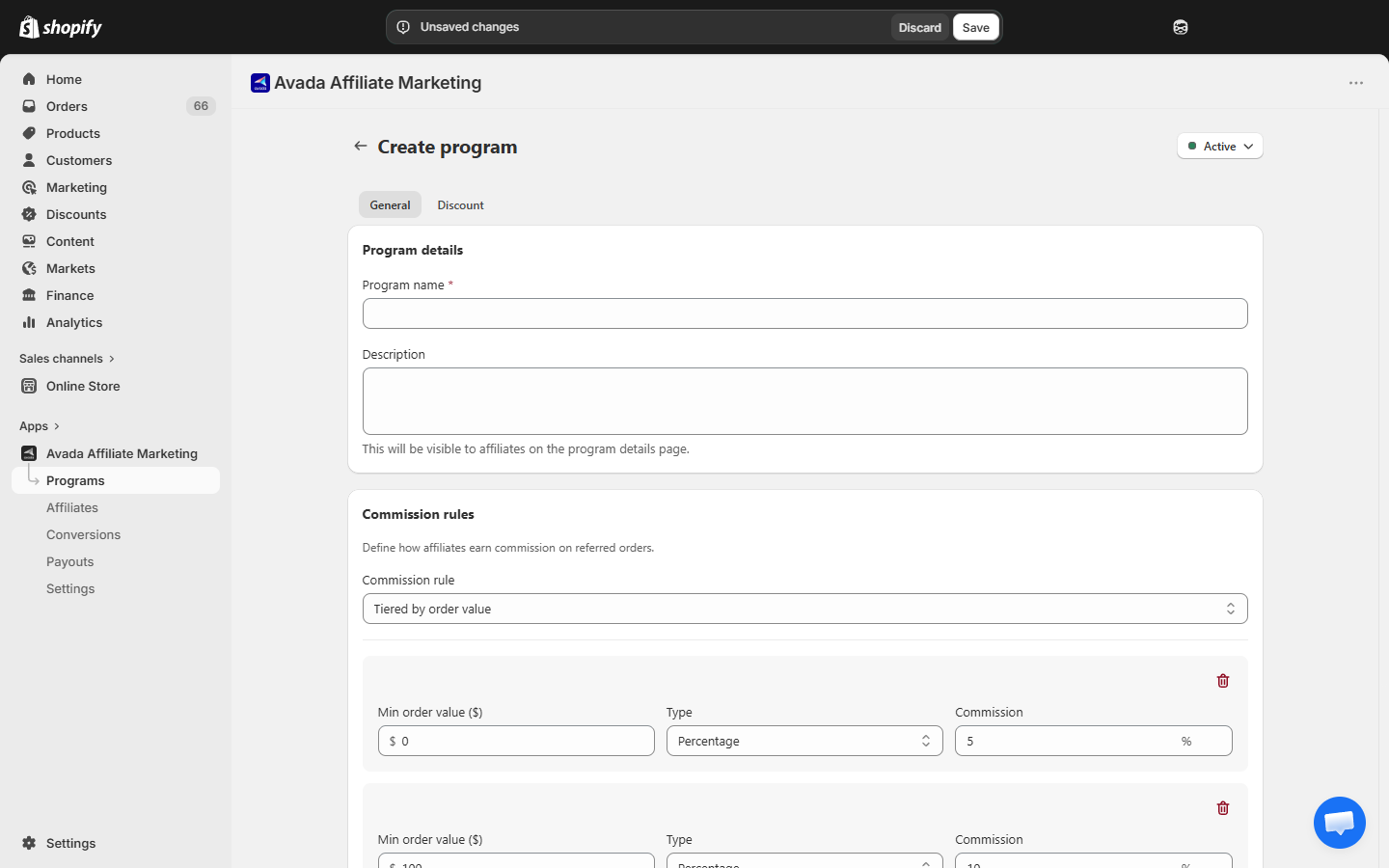
Pick Tiered by order value as the rule. The form replaces the single Commission amount field with a list of tiers. Each tier has:
- Min order value ($) — the threshold to enter the tier.
- Type — Percentage or Flat amount (per-tier choice).
- Commission — the rate for that tier.
The default tiers when you switch to Tiered are:
| Min order value | Rate |
|---|---|
| $0 | 5% |
| $100 | 10% |
| $500 | 15% |
Click Add tier to add more, or the trash icon to remove one.
The highest-applicable tier applies to the whole order, not a marginal calculation.
Example: A $250 order falls into the $100+ tier (10%). Commission = $25. A $600 order falls into the $500+ tier (15%). Commission = $90.
Changing commission types later
You can change the commission rule, rate, or tiers on a program any time. Changes only affect new conversions — any existing conversions keep the rate they were created with. This protects affiliates from retroactive cuts.
Which option should you pick?
- Starting out? Go with Fixed commission – Percentage at 10%. It works for almost any store.
- Want to reward volume? Use Fixed commission – Flat amount — affiliates focus on bringing orders, not basket size.
- High-AOV store? Use Tiered by order value — every big order pays them more, incentivizing bigger referrals.
You can always run several programs at once — one for influencers (tiered), one for friends-and-family (flat $5), etc.
Next step
- Create a Program — step-by-step walkthrough.
- Commission Calculation — exact formulas and edge cases.