Welcome to Avada Affiliate Marketing
Avada Affiliate Marketing is a free Shopify app that lets you run an affiliate program directly from your store. Create commission plans, invite affiliates, track their sales, and pay them — without paying a monthly fee for another app.
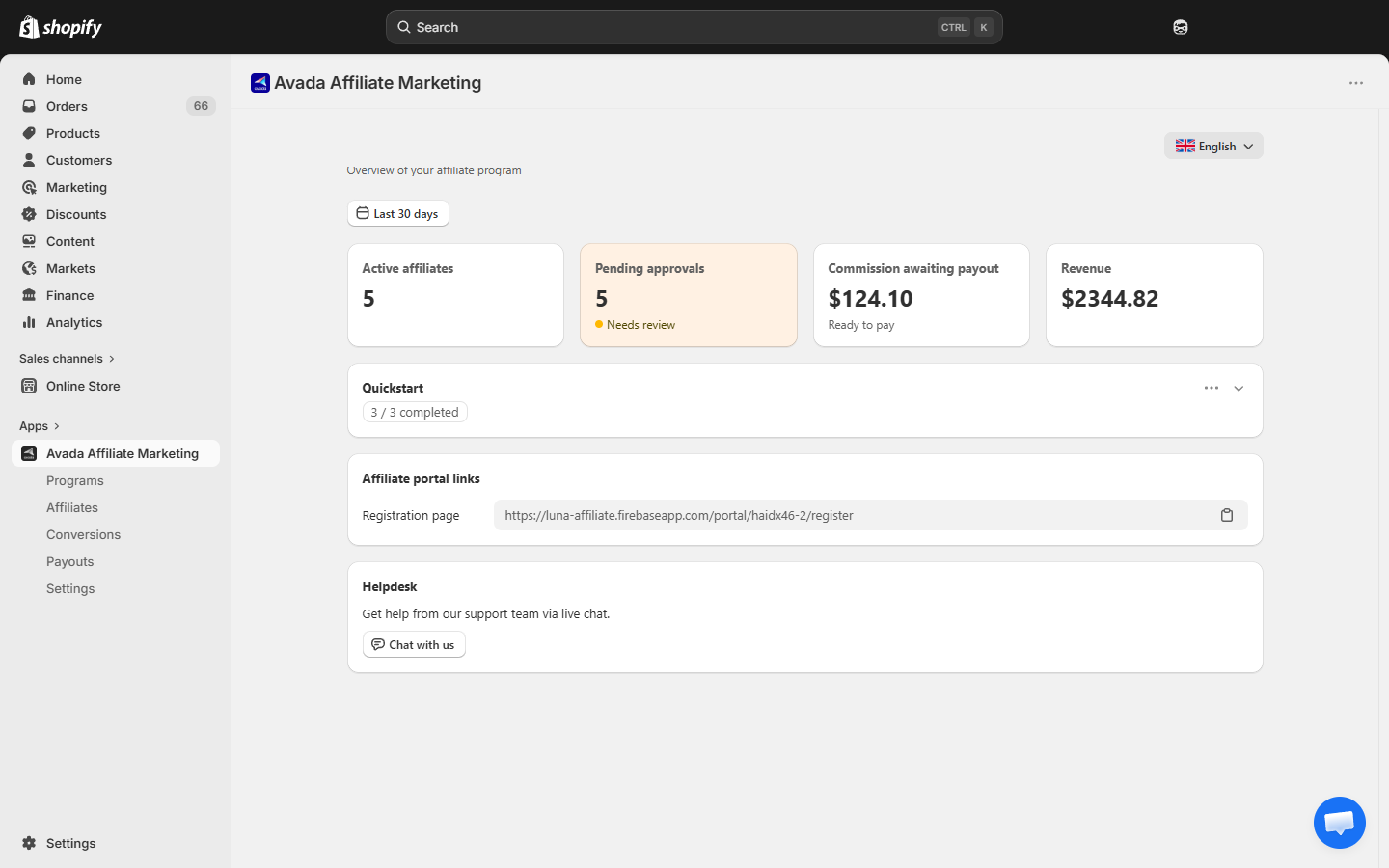
Your Home dashboard
When you open the app, the Home screen gives you the program at a glance:
- Four stat cards — Active affiliates, Pending approvals, Commission awaiting payout, Revenue (filterable by date range, default Last 30 days).
- Quickstart — a checklist of onboarding tasks (create a program, add an affiliate, enable the web pixel). The card shows progress like "3 / 3 completed".
- Affiliate portal links — a copy-ready link to your public affiliate signup page (
.../portal/{your-store}/register). - Helpdesk — a Chat with us button that opens our live chat for direct support.
What you can do with this app
- Create commission programs — flat fee, percentage, or tiered by order value.
- Invite affiliates — share a signup link, or add them manually by email.
- Track referral orders automatically — through referral links (Web Pixel) and coupon codes.
- Approve or deny conversions — review every sale before it counts as commission.
- Pay commissions — mark payouts as paid and keep a full history.
- Give affiliates their own portal — a dedicated web app where they see earnings, copy their referral link, and manage their payment method.
Get started in 3 steps
Popular topics
Create your first programAdd an affiliateApprove a conversionPay an affiliateHow tracking worksTroubleshooting
Who is this guide for?
This user guide is for Shopify merchants who want to launch or manage an affiliate program. It walks through every screen of the Admin app and explains what each setting does.
Looking for docs aimed at your affiliates? Point them to the Affiliate Portal section — it is written from the affiliate's point of view.
Need help?
- Email us: [email protected]
- Install on Shopify: Avada Affiliate Marketing on the Shopify App Store (opens in a new tab)