Set Default Program
When an affiliate signs up through your public Portal Signup Link, they need to be assigned to a program — otherwise they cannot earn commission. The default program is the one they automatically join.
You need exactly one default program at any time if you plan to use the public signup link. If no default is set, new signups are assigned to the first program created.
How to set a program as default
- Go to Programs in the sidebar.
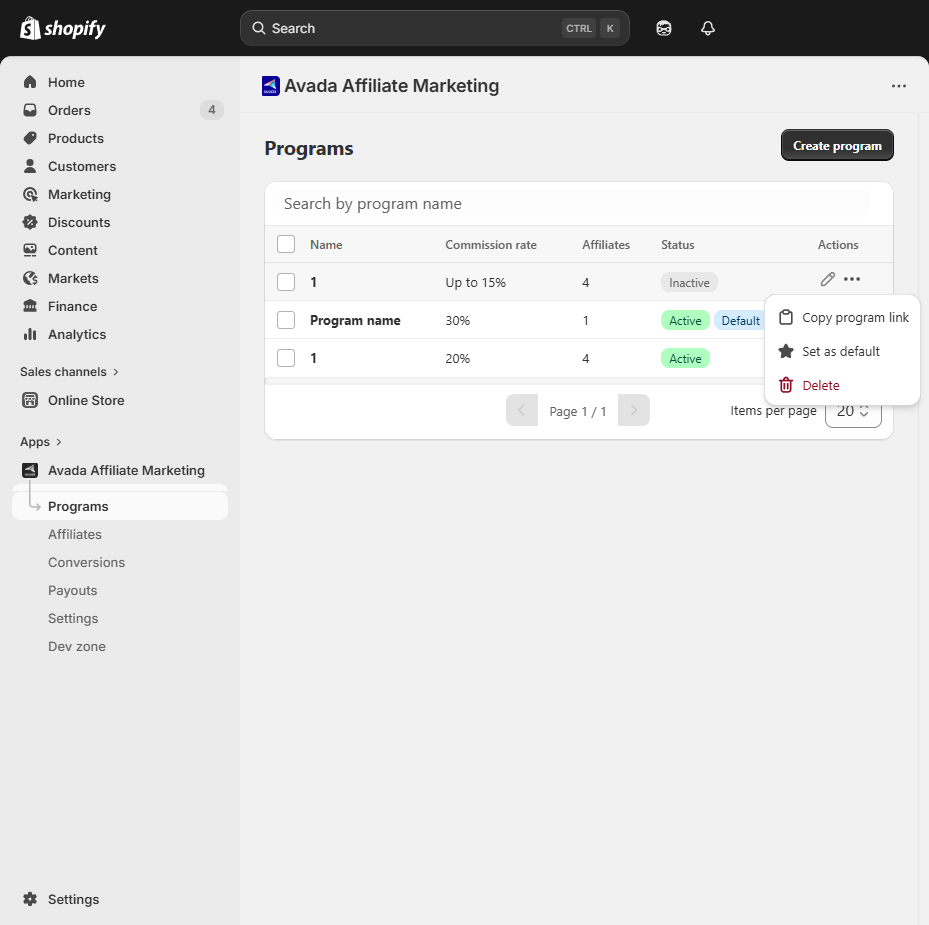
- Find the program you want as default.
- Click the ⋯ menu in the Actions column of the row.
- Select Set as default.
A Default program updated toast appears, and a small Default badge appears next to the program name in the Status column.
Changing the default
To switch default to a different program, repeat the same steps on the new program. The old one loses its Default badge automatically — only one program can be default at a time.
What if I do not want a default?
If you only recruit affiliates manually (never share the public signup link), you do not need a default program. You assign each new affiliate to a specific program when you create them in the Affiliates screen.
However, we still recommend marking one program as default as a safety net — so an accidentally-shared signup link still assigns the new affiliate somewhere.
Tip — use "Default" for your general-purpose program
The most common pattern is:
- Default: a 10% program for the general public.
- VIP / Influencers: 15–20% program, affiliates added manually or invited one-by-one.
New signups from your marketing pages fall into the default automatically, and you promote high performers to VIP later.
Next step
- Invite via Portal Signup Link — how to share the public link.
- Approve or Disapprove — review new signups before they can earn.