Affiliate Dashboard
The Dashboard is the first page you see after logging in. Everything you need is here: your program details, performance numbers, your referral link, and any discount codes the merchant has set up for you.
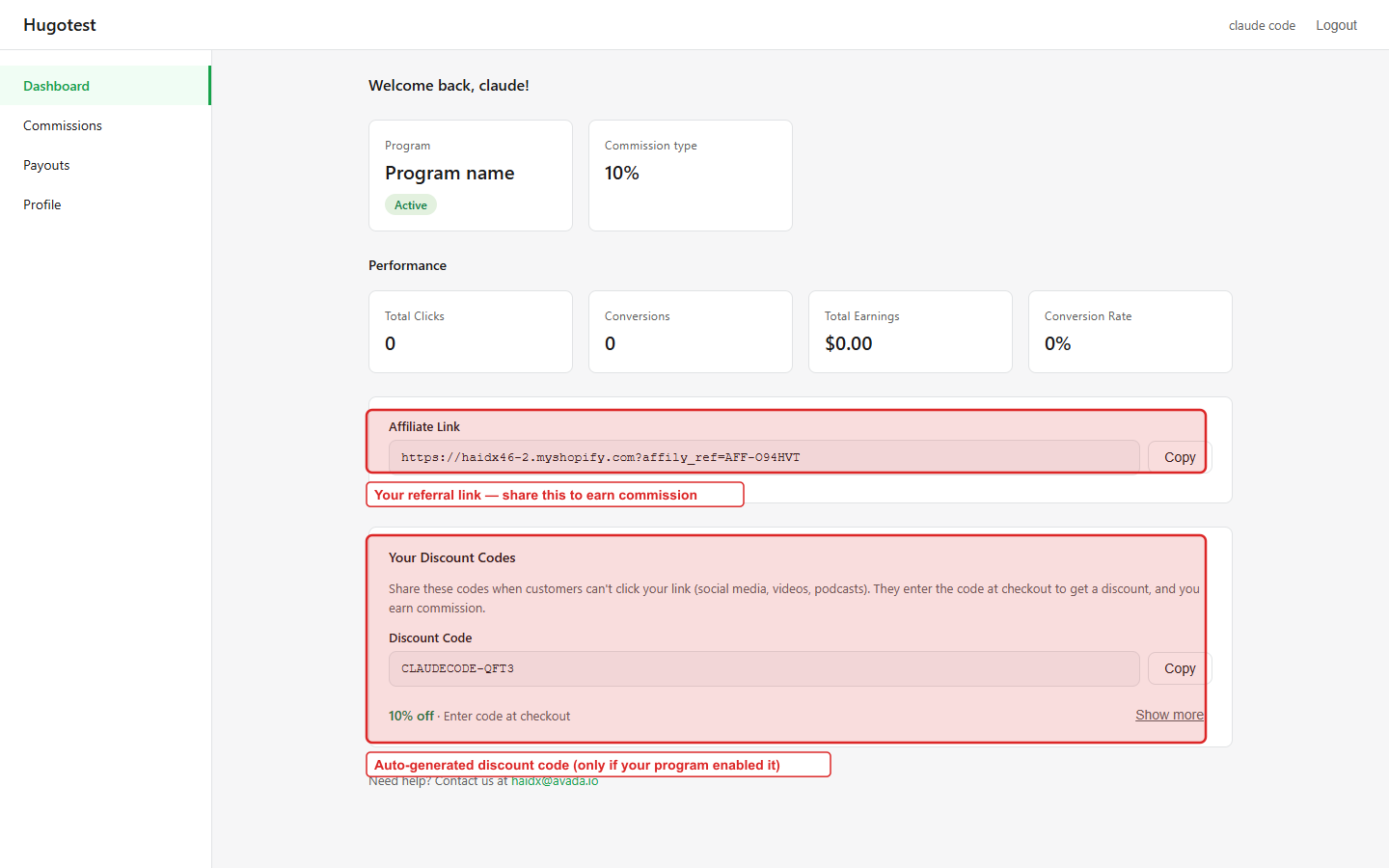
Top of the page
A short greeting ("Welcome back, [your name]!") followed by two summary cards:
| Card | What it shows |
|---|---|
| Program | The program you belong to, with its Active / Inactive badge |
| Commission type | Your commission rate — e.g. 10% or $5 |
If the program is Inactive, no new orders will earn you commission until the merchant re-activates it.
Performance
Four numbers update in real time as your link is clicked and orders come in:
| Card | Meaning |
|---|---|
| Total Clicks | Number of times someone visited the merchant via your referral link |
| Conversions | Referral orders attributed to you (across all statuses) |
| Total Earnings | Everything you have ever earned (approved + paid) |
| Conversion Rate | Conversions ÷ Total Clicks — how well your traffic buys |
A new click appears within seconds. New conversions appear within 1–2 minutes of the customer checking out.
Your Affiliate Link
The most important thing on this page. The card shows the full URL plus a Copy button:
https://merchant-store.myshopify.com?affily_ref=AFF-XXXXXXShare this link wherever you promote the merchant — Instagram bio, TikTok captions, YouTube descriptions, blog posts, newsletter, anywhere a link goes.
When someone clicks it, a tracking cookie is dropped on their browser. Any purchase they make in the next 30 days (or the merchant's custom duration) is credited to you.
Making the link shorter
The full URL is long. If you want a shorter version:
- Use a free link shortener — Bitly, TinyURL.
- Use a Linktree-style bio page that includes the link.
Your Discount Codes
If your program has the Customer discount feature enabled, the merchant has auto-generated a unique coupon code just for you. You will see it in this card with:
- The Discount Code (e.g.
SARAH-X7K2) and a Copy button. - The discount value (e.g. "10% off · Enter code at checkout").
- A Show more link to view conditions (minimum purchase, usage limits, etc.).
How discount codes work for you:
- Share the code anywhere — video captions, livestreams, podcast ads, even verbal recommendations.
- When a shopper uses it at checkout, you get the credit even if they never clicked your link.
- Codes work on any device (cookies don't carry between phones and laptops, but codes do).
If you don't see this card, your program does not use coupon-code tracking — only referral links. Ask the merchant if you want them to enable it.
Need help?
The bottom of the page shows the merchant's support email. Click it to email them directly — for questions about commissions, payouts, or your account.
Tips for more earnings
- Use both link and coupon when you have one — cover every sharing channel.
- Post natively on each platform — a link in an Instagram story works better than the same generic link everywhere.
- Be honest about affiliate relationships — disclosure builds trust and FTC / local ad laws often require it.
- Focus on value — why someone should buy, not just that there's a discount.