Submit Feature Requests
The Feature requests board lets you suggest new features, propose improvements, and report bugs right inside the app. You can also see what other merchants have asked for and upvote the ideas you need too. Our team reviews every request and uses the vote count to decide what to build next.
Why this matters
If you only tell us in chat, your idea stays in one conversation and nobody else can back it up. On the board, every merchant who needs the same thing can upvote it, so popular requests move up our roadmap faster. You also see the status of each request, so you know whether we are reviewing it, building it, or have already released it.
Where to find it
There are two ways in:
- Left menu → Feature requests (right below AI connections).
- Home → Helpdesk card → Feature requests (next to Read guide).
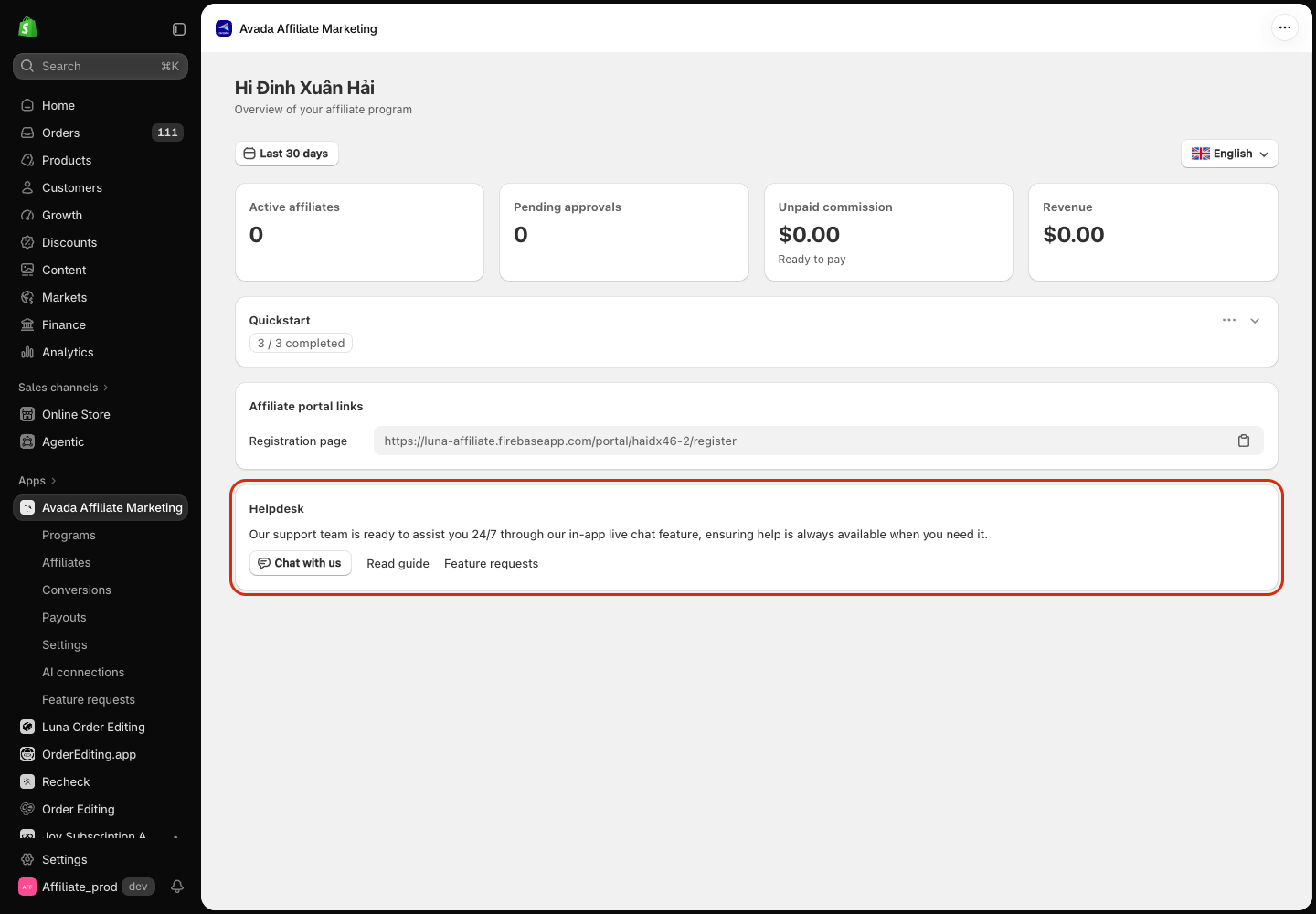
The board is available on every plan, including Free, for everyone who can open the app (store owner and staff).
The board at a glance
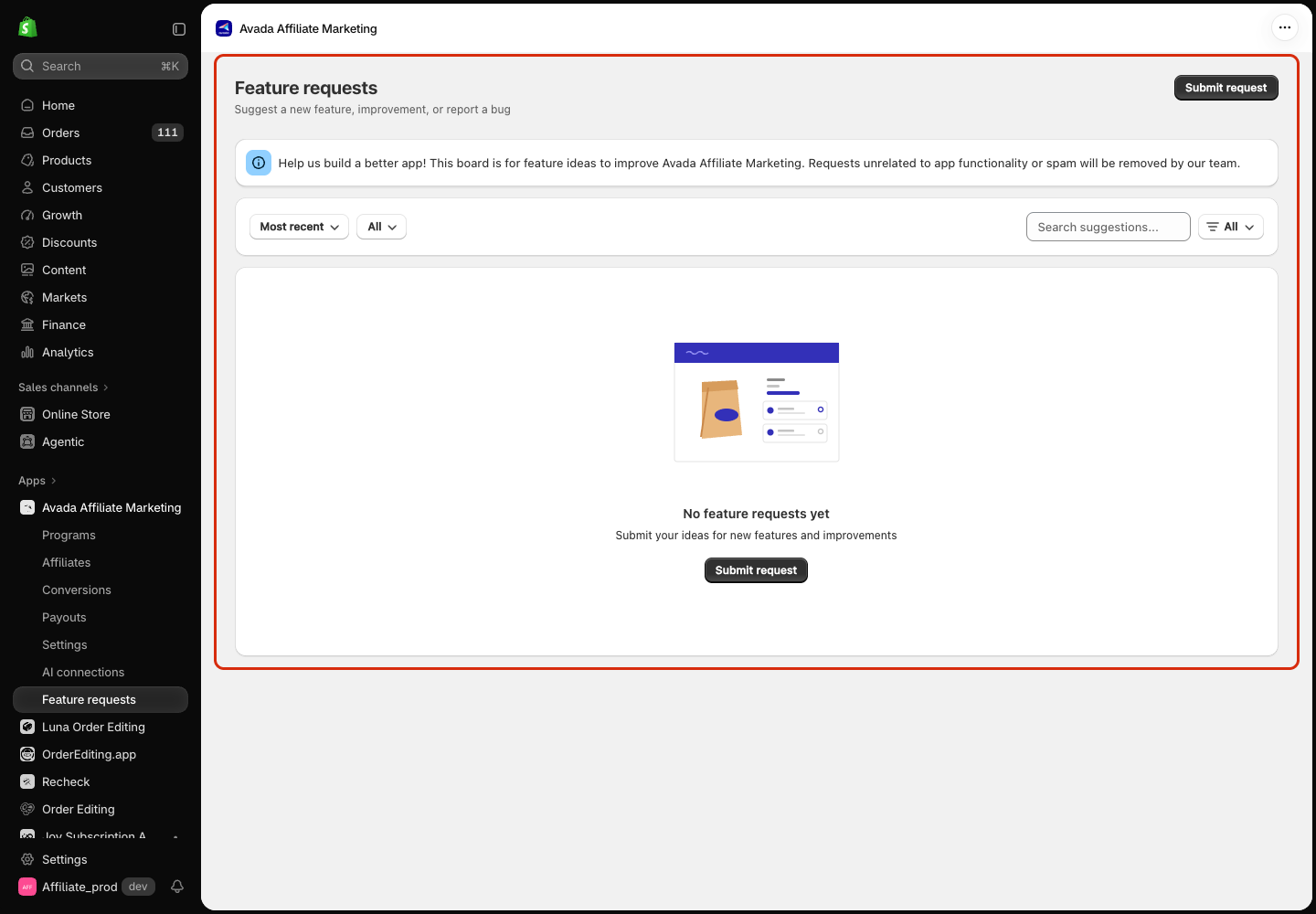
Each request card shows its status, title, who submitted it and when, the description, and an upvote button with the vote count. The board shows 10 requests per page; use Previous / Next at the bottom to move between pages.
Use the bar above the list to find what you need:
| Control | Options | What it does |
|---|---|---|
| Sort | Most recent (default), Most popular | Newest requests first, or most upvoted first |
| Status | All, Pending, Considering, Doing, Completed | Show only requests in one status |
| Search | Type in Search suggestions... | Filters as you type, matching the title and description |
| Type | All, New feature, Improvement, Bug report, My submissions | Show one type of request, or only the requests your shop submitted |
My submissions includes requests you sent anonymously, so you can always find your own requests.
The board is empty? That just means nobody has posted yet, or nothing matches your filters. Click Submit request to post the first idea, or reset the filters to All.
Submit a request
Step 1 — Open the form
Click Submit request at the top right of the page (or the Submit request button on the empty board). The Submit a feature request window opens.
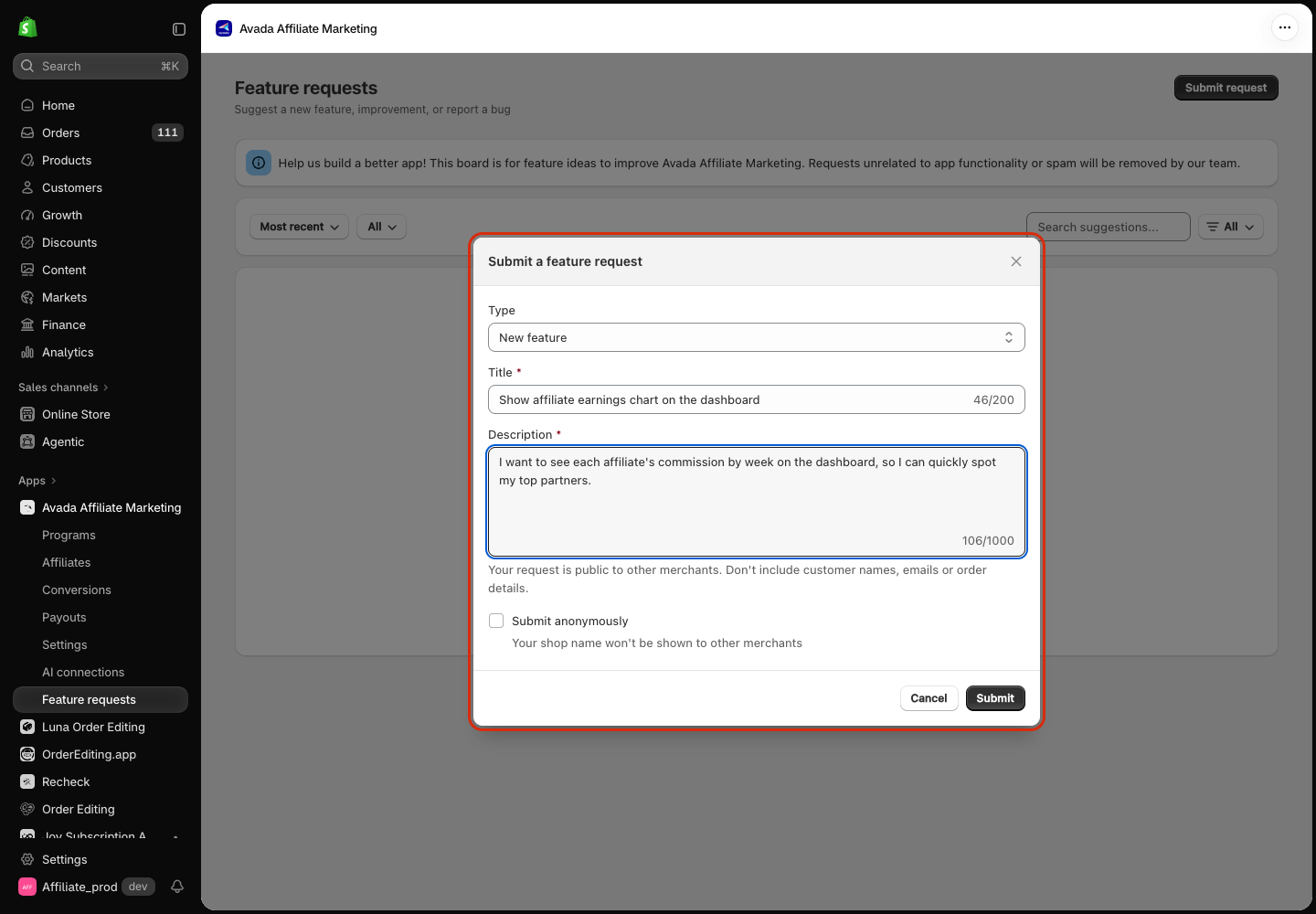
Step 2 — Fill in the request
- Type — choose New feature, Improvement, or Bug report. Default: New feature.
- Title (required) — a short summary, up to 200 characters.
- Description (required) — the details, up to 1,000 characters. Tell us what you are trying to do and why. A concrete example helps us a lot.
Your request is public to other merchants. Don't include customer names, emails or order details in the title or description.
Step 3 — Choose whether to show your shop name
By default, other merchants see your shop name next to your request. Tick Submit anonymously if you prefer: other merchants then see Anonymous instead of your shop name.
Step 4 — Submit
Click Submit. The Submit button is only active once both Title and Description have text. The window closes and your request appears at the top of the list with the status Pending.
Report a bug
Choose Bug report as the Type. A line appears under the field: Need help fast? Chat with our support team. followed by a Chat with support link.
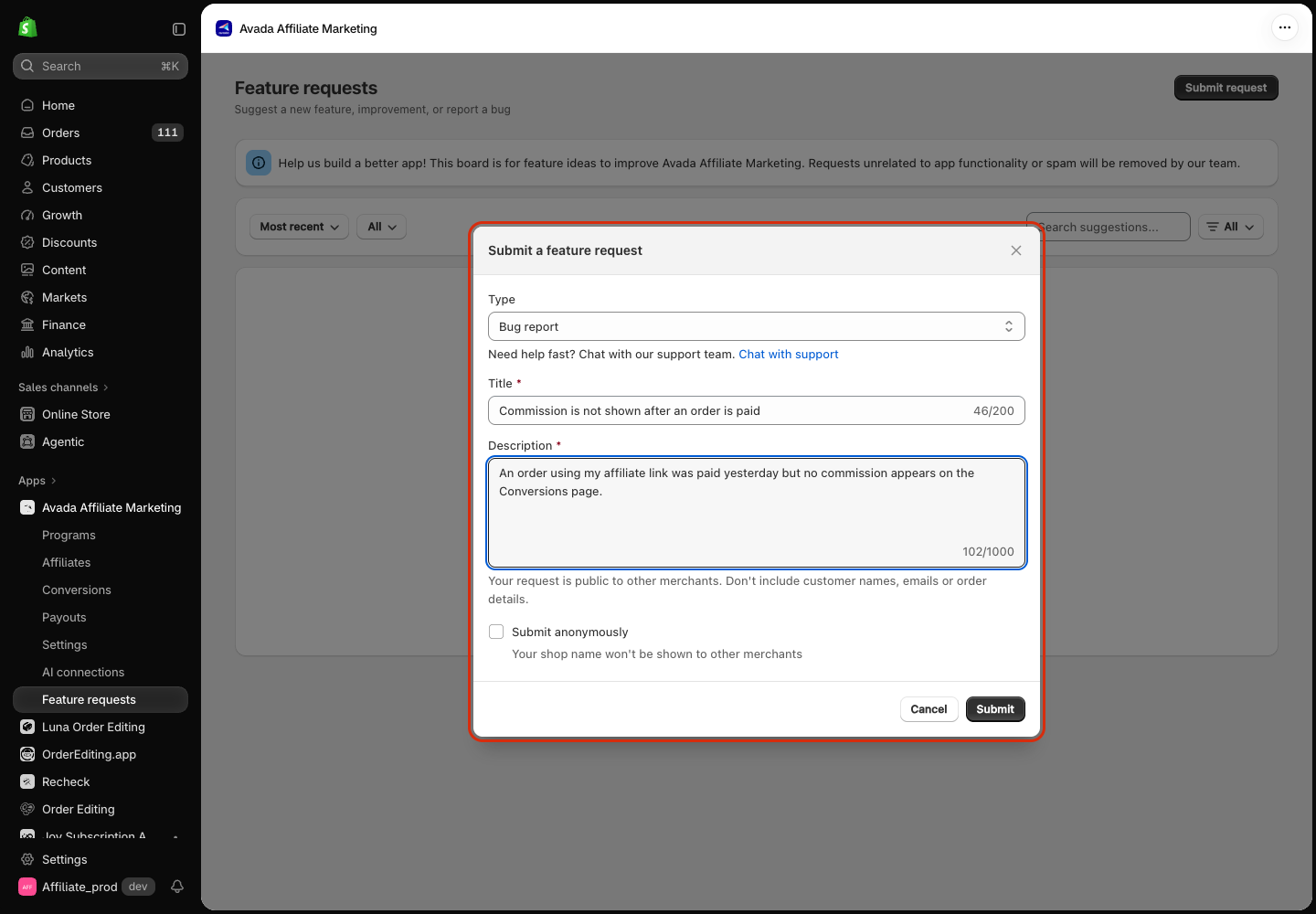
- If the bug blocks you right now (for example, a conversion was not recorded or a payout looks wrong), click Chat with support. Live chat opens so our support team can help you directly. The form stays open and keeps what you have typed.
- You can still submit the bug to the board, so other merchants who hit the same problem can upvote it.
Upvote a request
Click the upvotes button on any request you also need. The count goes up and the button turns green to show your shop has voted. Click it again to remove your vote.
- You can vote on your own requests and on requests that are already Completed.
- Votes count per shop, not per staff account. If a colleague already voted from the same store, the button is already green for you, and clicking it removes the shop's vote.
What each status means
Hover over a status badge to see its meaning in the app.
| Status | In the app | What it means |
|---|---|---|
| Pending | Submitted. Our team will review it soon | Just submitted. Our team has not reviewed it yet |
| Considering | Our team is reviewing this idea | We have read it and are evaluating it. Not a promise to build yet |
| Doing | We're building this | We decided to build it and work is in progress |
| Completed | Available now | Released and available in the app |
Requests posted by our team show Avada team as the author.
How it actually works
- Status updates are not live. You see a new status the next time you open or reload the page. We don't send an email or notification when a status changes.
- Sort is applied when the list loads. After you vote, cards stay where they are; the order updates the next time you reload or change Sort.
- Search matches exactly. It ignores upper/lower case but not accents, so despues does not match después.
- You can't edit or delete a request in the app. Contact support if you need a request changed or removed.
- Off-topic requests and spam are removed by our team. A removed request disappears from the board and from My submissions.
- The board shows up to 100 requests at a time for the current Sort. Use Most popular to see the most-voted ones.
Troubleshooting
| Symptom | Cause | Fix |
|---|---|---|
| Submit stays grey | Title or Description is empty (spaces only count as empty) | Fill in both fields |
| Failed to submit request banner in the form | The request could not be saved | Your text is kept. Click Submit again in a moment |
| Request timed out in the form | No response within 30 seconds; the request may still have been saved | Reload the page and check My submissions before submitting again, to avoid a duplicate |
| Failed to load requests banner on the page | The board could not load | Reload the page. If it keeps happening, contact support |
| Vote count did not change after clicking | The vote could not be saved, or it was saved but the response was lost | Reload the page first to see the real count and button colour, then click again only if your vote is missing |
| Your request shows A merchant instead of your shop name | We could not look up your shop name | Your request is still saved, counted and listed in My submissions |
| You can't find your old request | It may have been removed as spam or a duplicate, or it is beyond the first 100 requests in this Sort | Switch Type to My submissions and try both Sort options. Ask support if it is still missing |
| Chat with support does nothing | The live chat widget is blocked (ad blocker) or not loaded yet | Allow the chat in your ad blocker, or use Chat with us on the Home page later |
Data & privacy
- Requests and votes are stored in Avada's internal feedback system, not in your Shopify store.
- Other merchants using the app see the title, description, type, status and vote count of each request, plus your shop name unless you submit anonymously.
- When you submit anonymously, other merchants don't see your shop name, but Avada still records which shop posted or voted on each request.
- Requests and votes are kept so our team can review and prioritise them. They are not removed automatically when you uninstall the app. Contact support to have your requests removed.
Next step
- FAQ — quick answers before you post a question.
- Troubleshooting — fixes for common tracking and payout issues.
- Privacy Policy — how the app handles your data.