Pending Payouts
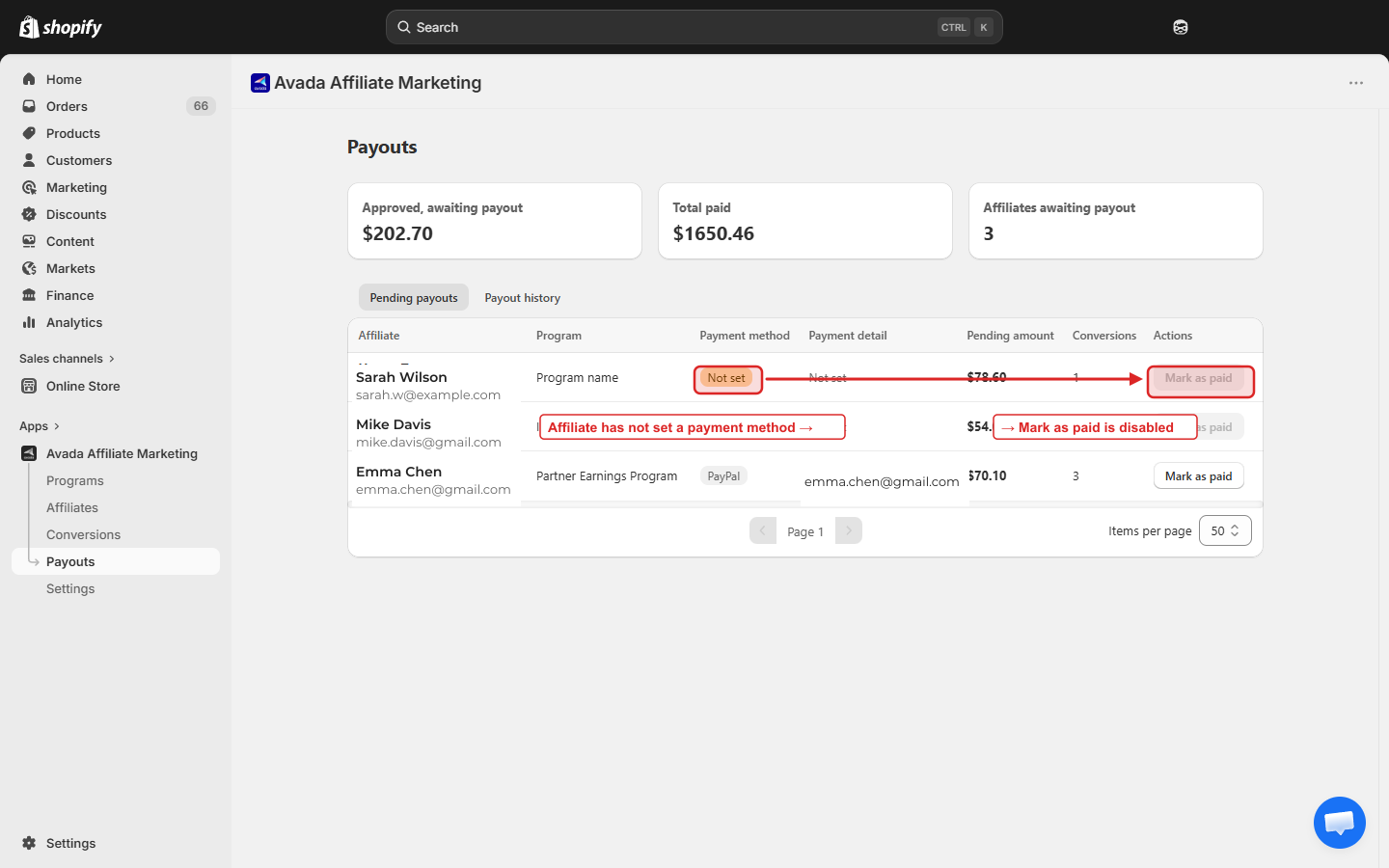
The Pending payouts tab shows all affiliates who currently have approved commission that has not yet been paid. This is your "to-pay" queue.
How to find it
Go to Payouts in the sidebar. The page opens on the Pending payouts tab by default. The other tab is Payout history.
Summary cards
Three cards at the top show totals across your whole program:
| Card | Meaning |
|---|---|
| Approved, awaiting payout | Sum of approved-but-unpaid commission across all affiliates |
| Total paid | Sum of everything you have ever paid out |
| Affiliates awaiting payout | Number of affiliates with at least $0.01 unpaid |
These update in real time as conversions are approved or payouts are marked paid.
The pending table
Each row is one affiliate:
| Column | What it shows |
|---|---|
| Affiliate | Name and email |
| Program | The program the affiliate belongs to |
| Payment method | A badge — PayPal, Bank Transfer, or Not set (orange) if the affiliate hasn't set one in their portal |
| Payment detail | The PayPal email or bank reference; reads Not set until the affiliate fills it in |
| Pending amount | Total approved commission not yet paid |
| Conversions | How many conversions are bundled into this payout |
| Actions | Mark as paid button |
The Mark as paid button is disabled when the affiliate's Payment method is Not set. They need to log in to the portal Profile and configure their PayPal email first. Hover the disabled button to see the tooltip "Affiliate has not set up a payment method yet."
The button is also disabled for any affiliate whose Pending amount is below the Minimum payout amount you set in Payment Schedule. Tooltip: "No pending amount to pay out."
How the Pending amount is calculated
Pending amount = SUM(approved conversions) − SUM(previously paid payouts) − SUM(refund adjustments)
This auto-updates as:
- New conversions are approved → pending goes up.
- You mark a payout as paid → pending drops by the paid amount.
- A referral order is refunded after payout → a Refund adjustment row reduces the pending amount.
Bulk-paying multiple affiliates
Select multiple rows with the row checkboxes. The toolbar at the top shows Mark {N} as paid — clicking it opens a single confirmation modal that processes all selected affiliates at once.
The modal warns you if any selected affiliate has no payment info set: "{N} affiliate(s) have no payment info set. They need to configure payment settings in their portal." Those rows are skipped.
Marking paid
The full modal flow is documented on Mark as Paid.
What affiliates see
Affiliates see their own awaiting amount in their portal Payouts page (card Awaiting payout). The number updates the moment you approve a conversion. They cannot request payouts themselves — only you can trigger them.
Exporting the pending list
There is no one-click export today. If you need a CSV for accounting, contact [email protected] — we can pull the data for you.
Next step
- Mark as Paid — the actual "pay out" flow.
- Payout History — see what you have already paid.