Pay an Additional Charge (Pay now)
When a customer edits an order in a way that raises the total (adds a product, increases quantity, upgrades shipping), the extra amount has to be collected. Instead of relying only on an email, our app shows a Pay now button right on the customer's order page, so they can pay the difference in one click without leaving.
You do not have to chase the payment manually. This runs automatically for any edit that increases the total.
Where it appears
On the Order Status Page and the Thank you page, at the top of the Edit your order card, a highlighted Pay now panel appears whenever the order still owes an additional amount.
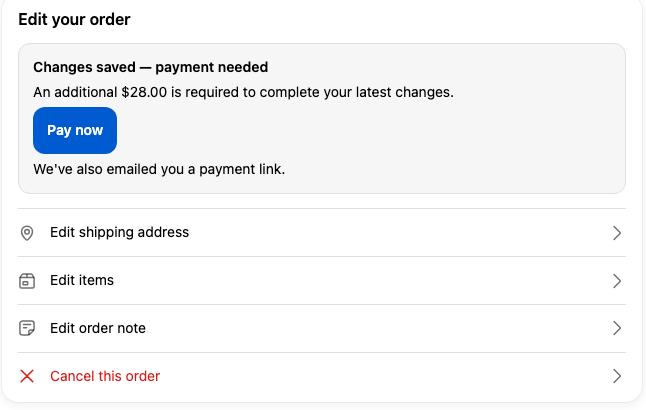
It shows only when the order has a real outstanding balance from an edit. There is no setting to turn it on or off, and no extra configuration on your side.
What the customer does
- After saving an edit that increases the total, the panel reads Changes saved, payment needed with the exact amount still due.
- The customer clicks Pay now and is taken straight to Shopify's secure checkout to pay the difference.
- Once paid, returning to the order page shows Payment complete and the button is gone.
The customer can also pay later: the panel stays on the order page until the balance is cleared, even after the editing time window has closed. Right below the button, a line reminds them that a payment link was also emailed, as a backup.
What happens with the money
| Situation | What the customer sees |
|---|---|
| Edit raises the total | A Pay now button + the amount due, right on the order page. Clicking it opens Shopify's secure checkout for the exact difference. |
| Already paid (via email or another device) | The app detects the balance is settled and shows Payment complete — the customer is never charged twice. |
| Edit lowers the total or leaves it unchanged | No Pay now button; a refund (if any) is handled automatically. |
What happens behind the scenes
- The Pay now button links to Shopify's own hosted payment page for the order's outstanding balance — the app does not take card details itself.
- The email payment link is still sent as a backup, and it points to the same payment page, so paying by either route settles the same balance.
- Before opening checkout, the app re-checks the balance live, so an already-paid order can't be charged a second time.
- When payment is received, Shopify marks the order paid and the button disappears everywhere the order is viewed.
Limits worth knowing
- The button appears only while the order has an outstanding balance from an edit. Fully paid, cancelled, or refunded orders don't show it.
- Paying settles the full additional amount; partial payments aren't supported.
- Orders in a currency different from your store currency fall back to the emailed payment link only.
Next step
Learn what your customers can change on an order in Edit Items and Edit Shipping Address.