Email Notifications
The Settings page holds one thing: the emails the app sends. Every rule about what customers can change lives separately, in Editing rules.
Each email is branded and, when turned on, replaces Shopify's matching default email, so nobody gets two messages for the same event.
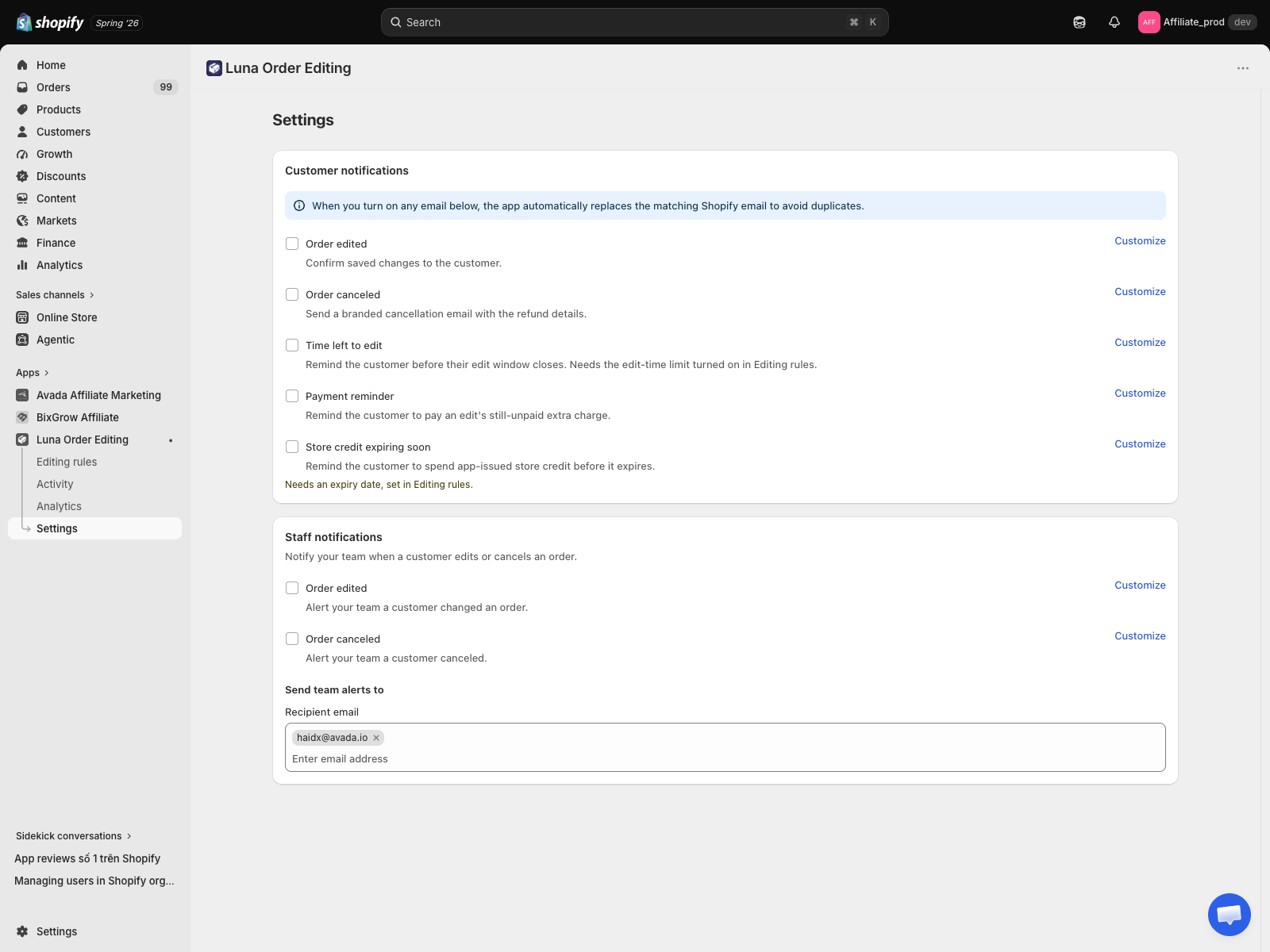
Two groups of emails
Emails are split into Customer notifications and Staff notifications. Every row is an independent on and off toggle with its own Customize button. All of them start off.
Customer notifications, five
| Sent when | |
|---|---|
| Order edited | A customer saves a change to their order. |
| Order canceled | A customer cancels their order. Includes the refund details. |
| Time left to edit | Shortly before the edit window closes. Needs a time window turned on in Editing rules. |
| Payment reminder | An edit left an unpaid balance and it still has not been paid. Defaults to 24 hours after the edit. |
| Store credit expiring soon | Before app-issued store credit expires, seven days ahead by default. Needs an expiry date set in Refund destination. |
Staff notifications, two
| Sent when | |
|---|---|
| Order edited | A customer changed an order. |
| Order canceled | A customer cancelled an order. |
Staff emails go to a recipients list you control. It starts with your store's own email and holds up to three addresses. Clear the list entirely and staff alerts stop.
Timing
Order edited and Order canceled are sent immediately when the customer saves. There is no batching and no delay. One save produces one email covering everything that changed in it, not one email per field.
Payment reminder, Time left to edit, and Store credit expiring soon are the scheduled ones, firing later by design. Each has its own timing, set inside its Customize editor.
Customize any email
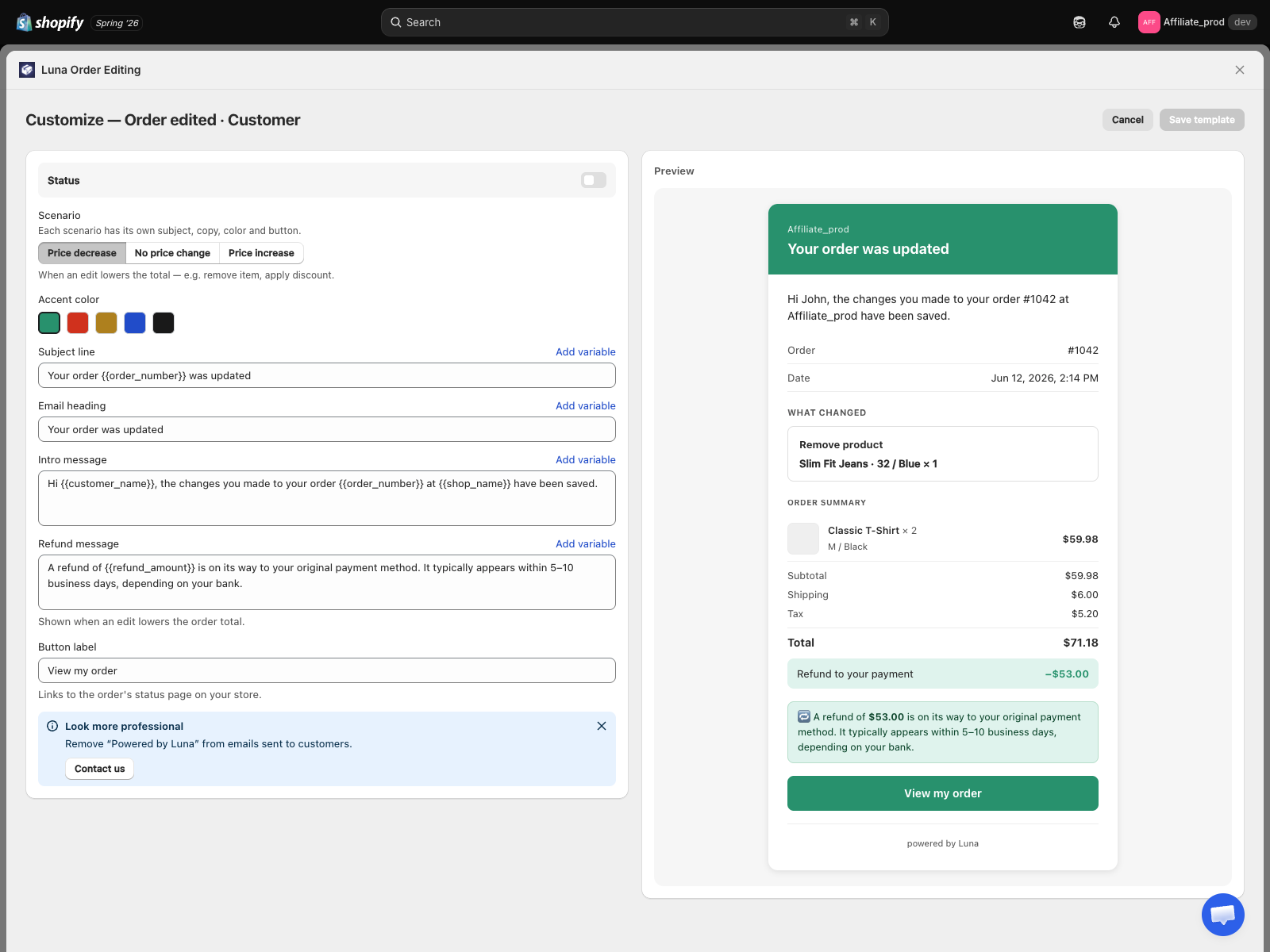
Each email's Customize button opens an editor for its subject, heading, body, button label, and accent colour, with a live preview beside it. You can insert variables such as order number, shop name, and refund amount with Add variable. These are not fixed templates.
For the Order edited email you can switch the preview between the price decrease, no price change, and price increase cases, so you see exactly what the customer gets in each.
When an edit changes the total
- The edit costs more, for example an added item or a faster delivery method: the customer's Order edited email carries a Pay now button that opens a secure Shopify checkout for the difference. The separate Payment reminder email chases anything that stays unpaid.
- The edit costs less, or the order is cancelled: the app issues the refund automatically and the email states the amount. Refunds to a card typically arrive within five to ten business days, depending on the bank. Where the money goes follows your Refund destination setting.
Replacing Shopify's defaults
When you turn an email on, the app suppresses Shopify's matching default, for example Shopify's own cancellation email, so customers get your branded version instead of two emails. Turn it back off and Shopify's default takes over again.
Translating emails
Email content is edited per email in its Customize editor. It is not covered by the Translations panel, which handles the storefront widget only.
See also
- Editing rules, everything customers can change
- Edit time window, needed before Time left to edit can be turned on
- Email delivery, the timing rules in one page