Edit Time Window
Part of the Edit window and limits card, the first card in General settings inside Editing rules. It decides when the customer-facing widget hides itself.
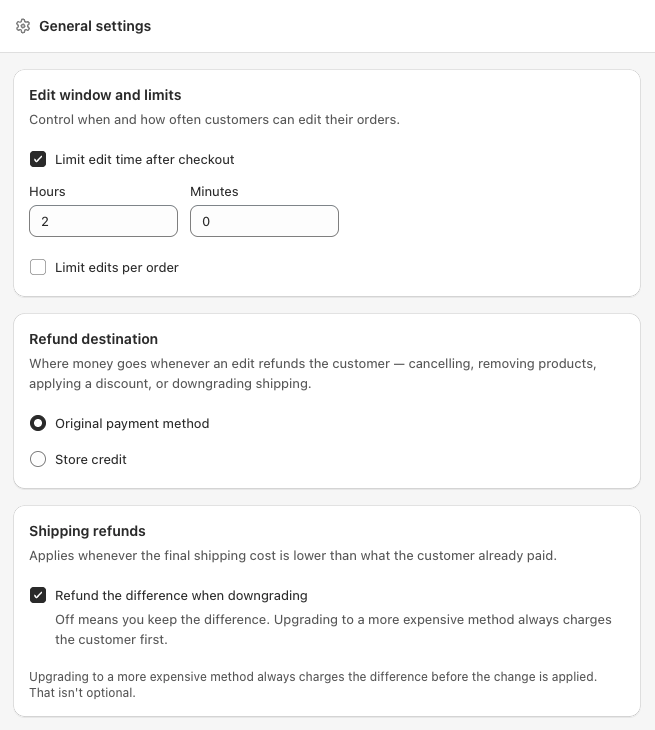
Two modes
Mode 1, until fulfilled. This is the default
Leave Limit edit time after checkout unticked and the customer can edit until the order is fulfilled in Shopify. The moment fulfilment status flips, the widget hides. Even mid-edit, the next save is blocked with a short message saying the order is now in fulfilment.
This is the most permissive option and the one we recommend for most stores. It mirrors how customers think: my package has not shipped yet, of course I can change it.
Mode 2, a fixed window after checkout
Tick Limit edit time after checkout and set Hours (0 to 72) and Minutes (0 to 59). Examples:
0h 30m, a half-hour grace period.2h 0m, fits a two-hour pick window.24h 0m, covers a full day.
When the window expires, the widget hides regardless of fulfilment state. If fulfilment happens before the window expires, fulfilment wins and the widget hides early.
We use a checkbox plus two number inputs rather than a dropdown, because a value like six hours thirty minutes is awkward to express in a single list.
Turning on the Time left to edit customer email requires a time window. Without one there is no deadline to remind anyone about. See Email notifications.
What the customer sees when blocked
The Edit your order card is one shared block. Every action, edit address, add note, apply discount code, edit items, change shipping method, cancel, lives inside it and appears or disappears together. There is no separate rule per action.
The whole block hides the moment any one of these is true:
- The order is fulfilled or partially fulfilled. A partial shipment counts as fulfilled.
- The edit time window has run out, either the fixed window in Mode 2 or fulfilment in Mode 1.
- The order has been fully refunded.
- The order has been cancelled.
- You turned every action off in Allowed edit types, or the order hit its Max edits limit.
We do not show a "you can no longer edit" banner. It only creates support pings asking why, without giving anything back.
One exception, Pay now. If an earlier edit left an unpaid balance, the Pay now card stays visible until that balance is paid, even after the block itself has closed. A customer who upgraded their order can still pay the difference later. See Pay now.
Edge cases
- Partial fulfilment, treated as fulfilled. Better safe.
- Fulfilment cancelled, the window does not re-open. Once expired, always expired.
- Pre-orders and draft orders, not in scope.
See also
- Max edits per order, the other control in the same card
- Email delivery, when edit and cancel emails are sent