Allowed Edit Types
The Customer actions group in Editing rules controls what shows up on the customer-facing widget. Each row is one action, with an On or Off badge so you can read the whole rule set without opening every panel.
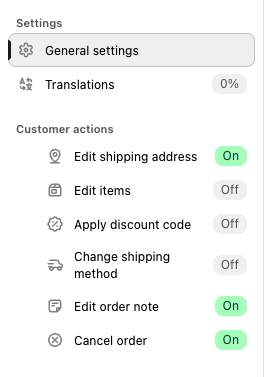
The six actions
| Action | What it lets the customer do | Default |
|---|---|---|
| Edit shipping address | Change the delivery address. You choose which fields are editable, including whether the destination country can change. | On |
| Edit items | Change the products on the order. Four separate switches, see below. | Off |
| Apply discount code | Apply a valid discount code after checkout. Always lowers the total, never adds a charge. Also enables the free-shipping code field inside Change shipping method. | Off |
| Change shipping method | Switch to another available delivery method. The difference is charged or refunded automatically. | Off |
| Edit order note | Leave a free-text note on the order. | On |
| Cancel order | Cancel with automatic refund and restock. | On |
Drag any row to change the order customers see these options in.
Edit shipping address
Turning the action on is only half the decision. The Editable fields card also lets you pick what customers may change. Ticked fields can be edited, unticked ones still appear on the order but are locked.
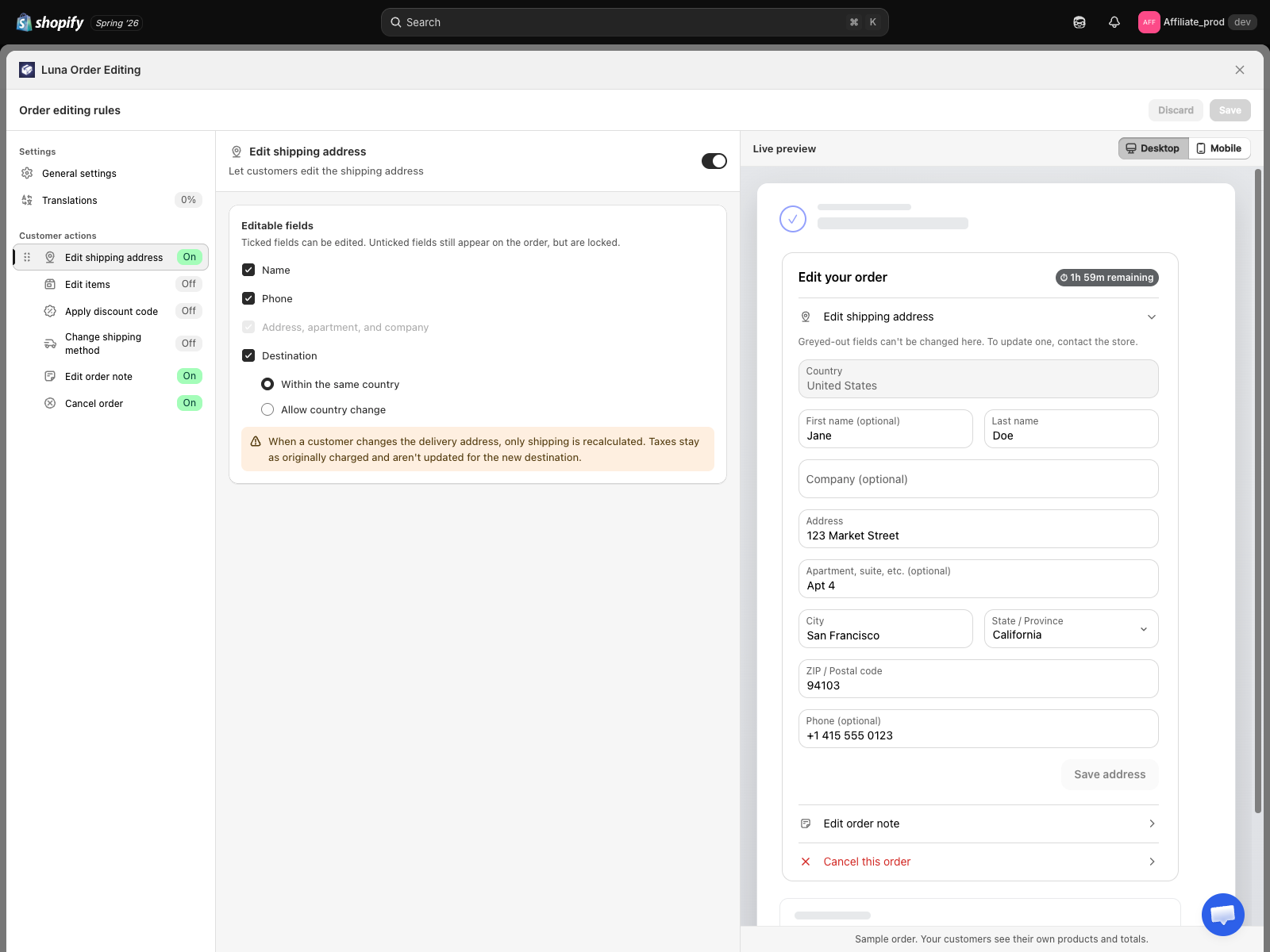
| Field | Default |
|---|---|
| Name | Ticked |
| Phone | Ticked |
| Address, apartment, and company | Always editable |
| Destination | Ticked, but limited to Within the same country |
Destination covers the city, state, ZIP, and country together, and has two modes:
- Within the same country, the default. Customers correct the city, state, and ZIP, and the country stays locked.
- Allow country change. The country becomes a dropdown. The app recalculates shipping for the new destination and settles the difference automatically. See Change country.
The panel warns you that only shipping is recalculated on a destination change. Product tax stays as charged at checkout, which is a Shopify limitation.
Untick everything and the app hides the Edit shipping address row entirely, since it would open onto nothing.
Edit items
One master switch plus four sub-switches:
| Switch | What it lets the customer do |
|---|---|
| Change product variant | Swap to another variant, size or colour, of the same product. |
| Change product quantity | Increase or decrease the quantity of a line item. |
| Add new products to order | Add another product. Flagged higher risk because it can raise the order total and trigger an extra charge. |
| Remove products from order | Remove a line item, with a refund for the removed amount. |
The Edit items row reads as On only when the master switch is on and at least one sub-switch is on. Otherwise the widget would show a row that opens onto nothing.
Item edits recalculate the order total. A lower total refunds automatically, following your Refund destination setting. A higher total sends the customer a Pay now button plus an emailed payment link, never a silent charge.
Apply discount code
Beyond on and off, this panel lets you decide which discounts customers may use and when. See Discount code rules.
Change shipping method
Optionally limit customers to a shortlist of delivery methods instead of everything your rates return. Tick Limit which methods customers can pick and add the method titles you want to allow, up to 50.
Whether a downgrade refunds the customer is set in General settings, under Shipping refunds.
Edit order note
Optionally cap the note length. Leave the cap off and the widget applies its own 500 character limit. Turn it on and the field starts at 250 characters, adjustable between 10 and 5000.
Cancel order
The panel holds the list of reasons customers pick from when cancelling. The app ships six:
- Ordered wrong item
- Changed my mind
- Item no longer needed
- Shipping takes too long
- Duplicate order
- Found cheaper elsewhere
Edit, remove, or add your own, up to 20 reasons of 120 characters each. Other, with a free-text box, is always pinned last and is not something you configure.
Cancelling always issues a full refund and restocks every item. The refund destination follows your Refund destination setting.
How to think about this
- Address, note, and cancel only, the shipped default. Safe for most stores and covers the majority of support tickets.
- Add discount code and shipping method when your fulfilment is slow enough that customers change their mind about delivery.
- Add item edits when your AOV is high or your pick window is long. This is the group most likely to change the order total, so it is the one to turn on last.
You can change this at any time. The change applies to all orders still inside the edit window, including orders placed before you flipped the switch.
When the customer sees nothing
If every action is off, the Edit your order card is hidden entirely. No empty state, no nag.
See also
- Editing rules, how the editor is laid out
- Edit time window, until when customers can edit
- Preview, check your configuration before saving
- Upsell products, recommend products during an edit, a separate channel from Add new products