Refund Destination
The Refund destination card in General settings, inside Editing rules, decides where a customer's money goes whenever an edit or a cancellation refunds them. Keep refunds on the original payment method, or hand them back as store credit so the money stays in your store for the customer's next order.
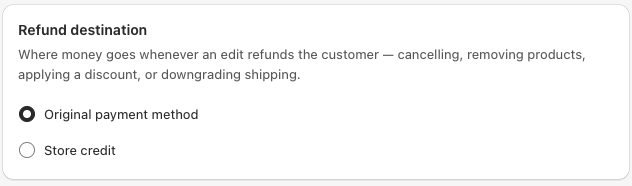
Two options
| Option | What happens |
|---|---|
| Original payment method, the default | Refunds go back to the card or wallet the customer paid with. |
| Store credit | The refund is added to the customer's store credit balance, which they can spend on a future order. |
This applies to every refund the app makes: removing an item, lowering a quantity, switching to a cheaper variant, applying a discount code, downgrading the delivery method, and cancelling the order.
Set an expiry, optional
When you choose Store credit, you can set how many days the credit stays valid, anywhere from 1 to 3650 days. Leave it off and the credit never expires.
If you set an expiry, turn on the Store credit expiring soon customer email in Email notifications. It reminds the customer before the credit runs out, seven days ahead by default. Shopify does not send a reminder of its own, so without this email the customer only finds out when the balance is gone.
Before you switch to store credit
For customers to actually spend store credit, two Shopify settings must be on. These live in your Shopify admin, not in the app:
- New customer accounts, under Shopify Settings, Customer accounts.
- Apply store credit at checkout, under Shopify Settings, Payments.
If these are off, the credit is still issued but the customer cannot spend it, so turn them on before you switch.
What the customer sees
When a refund will be issued as store credit, the customer sees a clear note before they confirm the edit or the cancellation on their order page.
The confirmation email also shows the store credit amount, the expiry date if you set one, and how to use it. To spend the credit, the customer signs in to their account with the order email, using a one-time code rather than a password, and chooses Apply store credit at checkout.
Good to know
- Guest orders. If an order has no customer account, the app refunds the original payment method instead, so nobody receives credit they cannot use.
- Currency. Store credit is issued in the currency the customer paid in, and can only be spent in that same currency.
- Switching back. Change the setting to Original payment method at any time. It only affects refunds made after the change.
- Shipping downgrades follow this setting too, but only when Refund the difference when downgrading is on in General settings.
See also
- Cancel an order, a common trigger for a refund
- Email notifications, including the store credit expiry reminder
- Refund and restock, what happens on a cancellation